Sometimes a travel agent may need to correct a passenger name inside a PNR (Passenger Name Record). Each GDS system uses a different command to update the name field.
Below are the common commands used in Sabre, Galileo, and Amadeus.
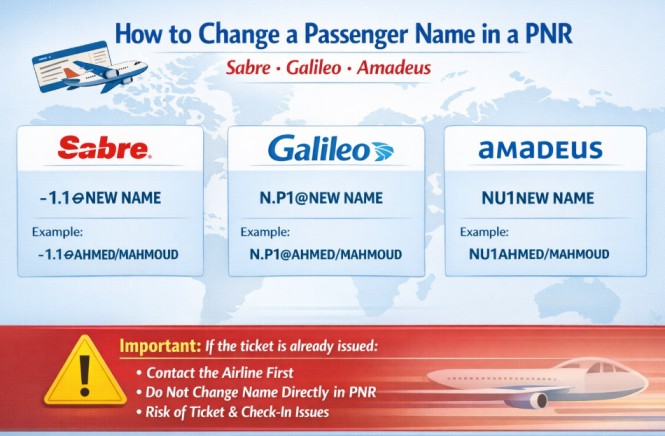
Sabre
To modify a passenger name in Sabre, use the following command:
-1.1¤NEW NAME
Example:
-1.1¤AHMED/MAHMOUD
This updates the name element for passenger 1.1 in the PNR.
Galileo
In Galileo, the command format for editing a passenger name is:
N.P1@NEW NAME
Example:
N.P1@AHMED/MAHMOUD
This changes the name for Passenger 1 in the booking.
Amadeus
In Amadeus, you can modify the passenger name using:
NU1NEW NAME
Example:
NU1AHMED/MAHMOUD
This updates the name for Passenger 1 in the reservation.
Important Notice
If the ticket has already been issued, you should not change the passenger name directly in the PNR.
Most airlines require agents to contact the airline first or follow a specific name correction policy before making any change. Editing the name after ticketing without approval can cause ticket problems or check-in issues.
Always confirm the airline’s rules before modifying a passenger name.
The Ultimate Amadeus Commands Guide
Retention Segments: How to Keep Your PNR Active
How to Use ARNK in Amadeus, Sabre & Galileo