Sabre Training — Master Sabre Commands on a Real Terminal, Free
A browser-based Sabre training simulator for travel agents who want to learn the GDS that powers North America and Latin America. Practice availability, PNR creation, data entry, queue selection, and signature — zero risk, zero cost.
The GDS HUB Sabre Terminal — See It in Action
Real Sabre command syntax, real responses, real workflow. This is the exact terminal you practise on from day one of Sabre training.
Real Sabre Screens You’ll Work With
Flight search, pricing, ticket display, and ticketing — every screen you need to master during Sabre training.
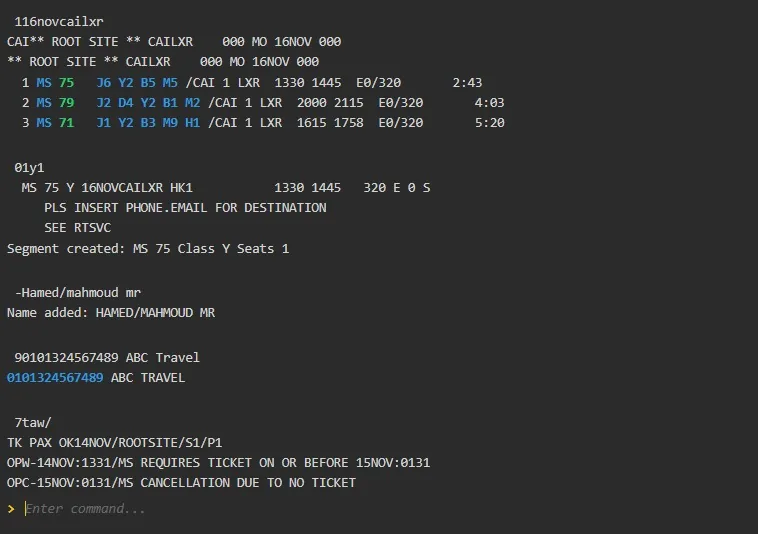
Search Flights in Sabre — The Availability Command
Sabre availability starts with the date and city pair — for example 113mayshjcai for 13 May, Sharjah to Cairo. Learn to read class buckets, flight numbers, times, and connection windows at a glance.
- Direct vs connecting flight identification
- Cabin class availability (Y, B, M, etc.)
- Airline filters and direct-flight qualifiers
- Time-zone-safe schedule reading
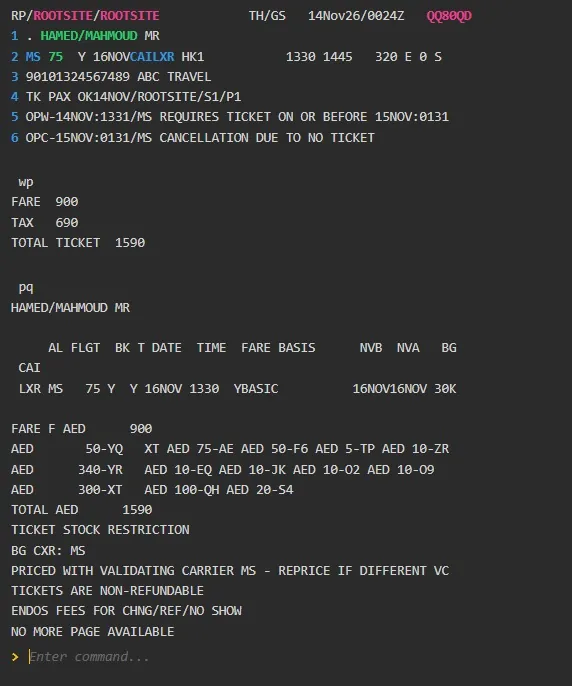
Price the PNR
Learn how to price the itinerary after building the PNR.
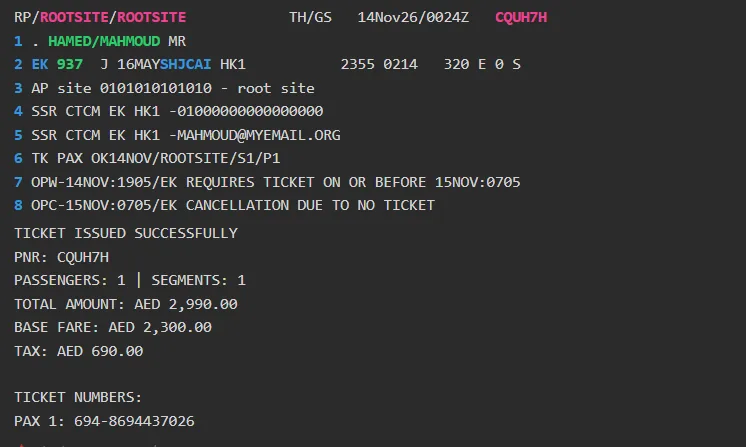
Display Tickets
Review issued tickets and confirm passenger details.
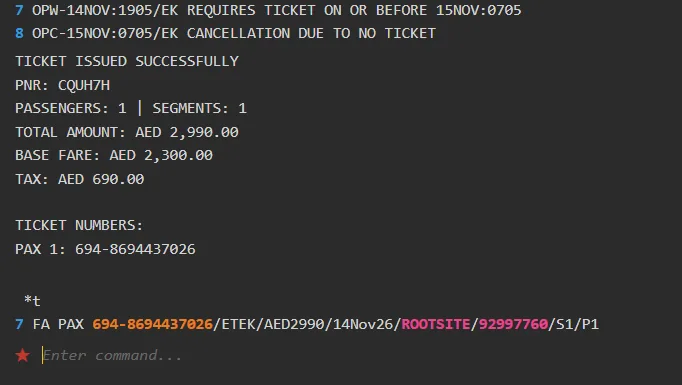
Issue Ticket
Learn to issue the electronic ticket against the priced itinerary.
Start Your Sabre Training Journey
Three quick steps to begin Sabre training today — create a free account, test your basics, then push to advanced.
Create a Free Account
Sign up in seconds and log in to the Sabre training simulator from any browser. No credit card, no installation.
Create Free AccountSabre Basics — PNR Guide
Test your foundational Sabre knowledge — PNR creation, availability displays, and the essential booking commands.
Sabre PNR GuideCompare GDS Platforms
See the differences between Sabre, Amadeus, and Galileo — and decide which one fits your career goals.
Compare GDS PlatformsSabre Course, Tutorials & Command Reference
Deepen your Sabre expertise with dedicated lessons, real-world tutorials, and the complete command reference written by working GDS professionals.
How to Create a PNR in Sabre
Step-by-step guide to building a complete Sabre PNR — availability, name, phone, queue selection, signature, and end transaction.
Read the guide →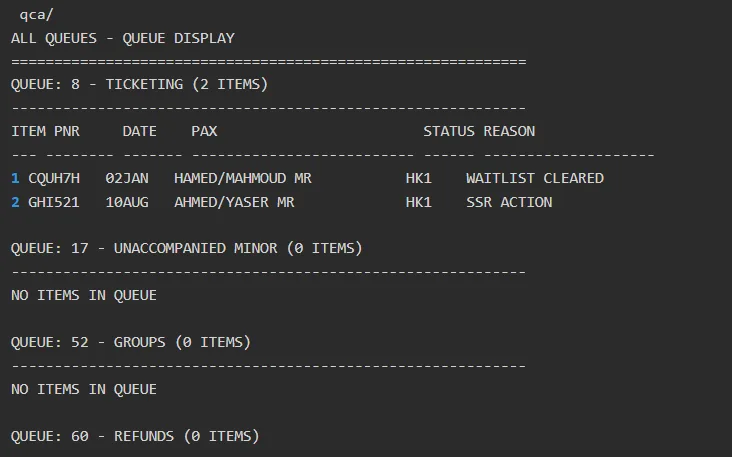
Sabre Queue — A Quick Guide
Learn how to manage PNRs in Sabre queues — how to review them, process them, and move them to the right queue.
Read the guide →
Sabre Commands — Complete Reference
Every Sabre command in one place — availability, name, phone, queue selection, signature, end and retrieve, and more.
Open the reference →📋 Sabre Commands Cheat Sheet
The fastest way to look up Sabre commands — availability, PNR, queue, signature and more, all in one reference page.
What Is Sabre — and Why Does Sabre Training Matter?
Sabre is one of the world’s leading Global Distribution Systems (GDS), used by airlines, travel agencies, travel management companies, and corporations across North America and Latin America. Originally built as American Airlines’ reservation system, Sabre now powers millions of flight, hotel, and car-rental bookings every day. According to industry data, Sabre holds roughly 30–36% of the global GDS market, making it the second-largest GDS behind Amadeus. If you want a career in travel — especially with agencies or OTAs targeting the Americas — Sabre training is one of the highest-value skills you can build.
Yet most people learn Sabre the hard way: on a live terminal, under pressure, terrified of a mistake that could cancel a real PNR or trigger an ADM. Sabre training on GDS Hub solves that problem. It runs the real Sabre command syntax in a safe sandbox, so you can type every command, see every response, and fix every error — all without touching a single live booking.
Why Hands-On Practice Beats Theory Every Time
You can read a Sabre manual cover to cover and still freeze the first time a client asks for a reissue on a non-refundable fare. That’s because Sabre is a muscle-memory skill. Commands like 113mayshjcai, -hamed/mahmoud, 7taw/, 6m, and er only become second nature when you type them repeatedly in realistic scenarios — availability, booking, pricing, ticketing. Sabre training on GDS Hub is built around exactly that loop: read → type → see → correct → repeat.
What You Can Do During Sabre Training
- Read Sabre availability displays — including class buckets, flight numbers, connection times, and equipment types.
- Add a passenger name with
-— for example-hamed/mahmoud. - Attach contact details with the agency name in the phone field, entered with
9. - Select the correct queue with
7taw/— either the OK queue (ticket has been issued) or the TIME LIMIT queue (ticket has a time limit). - Sign the booking with
6— using the first letter of the employee’s name — so it’s clear who created the booking or performed the action. - End and retrieve with
er— the Sabre equivalent of saving and retrieving a PNR in one step.
Who Is Sabre Training For?
Three groups get the most out of GDS Hub’s Sabre training. New agents use it to build muscle memory before their first agency shift. Working agents use it to refresh Sabre workflows they don’t touch every day — queue management, reissues, refunds, EMD issuance. And training teams use it to onboard new staff safely, without giving them live terminal access on day one.
What Makes GDS Hub Different
Most Sabre tutorials stop at theory. GDS Hub gives you a practice environment where every command you learn is immediately testable. Combined with our dedicated Sabre PNR guide, Sabre queue guide, and full Sabre commands reference, you move from “I read about it” to “I can do it” in a fraction of the time — which is the whole point of structured Sabre training.
Why Sabre Training Opens Career Doors
Sabre fluency is one of the most in-demand, transferable skills in the global travel industry — especially in the Americas.
Dominant in North America & LatAm
Sabre is the go-to GDS for travel agencies across the United States, Canada, and Latin America. Sabre training is essential for anyone targeting these markets.
Skills That Command Better Pay
GDS-certified travel professionals earn significantly more than entry-level customer-service roles — because Sabre work is specialised and can’t be automated away quickly.
Remote & International Roles
Sabre skills travel with you. Whether you work for a local agency in Dallas or a corporate travel desk in São Paulo, the terminal commands are the same.
Most-Used Sabre Commands
A sample of the Sabre commands you’ll practise during Sabre training. For the full list, open the Sabre commands reference.
| Command | Function | Example |
|---|---|---|
113mayshjcai | Display flight availability | 113mayshjcai |
- | Add passenger name | -hamed/mahmoud |
9 | Add phone / contact with agency name | 9 010101010 abc travel agent |
7 | Select the queue (OK or TIME LIMIT) | 7taw/ |
6 | Employee signature (first letter of name) | 6m |
er | End and retrieve PNR | er |
Sabre Training Skills You Can Master
From the first availability display to the complete PNR — the core Sabre booking lifecycle, end to end.
Sabre Training in Four Simple Steps
A clear path from complete beginner to confident Sabre user — no shortcuts, no guesswork.
Level Up Advanced
Master queues, reissues, and refunds — then walk into any interview ready.
Sabre Articles to Go Deeper
Real-world guides from our blog — command references, troubleshooting, and ticketing workflows.
How to Create a PNR in Sabre — Step by Step
The complete walkthrough: availability, name, phone, queue selection, signature, and end and retrieve with er.
Read the guide → Queue ManagementSabre Queue — A Quick Guide for Managing PNRs
Learn how to manage PNRs in Sabre queues — how to review them, process them, and move them to the right queue.
Read the guide → Command ReferenceSabre Commands — The Complete Reference
Every Sabre command in one place — availability, name, phone, queue selection, signature, end and retrieve, and more.
Open the reference → GDS ComparisonAmadeus vs Sabre vs Galileo — Which GDS to Learn?
Compare the three major GDS platforms by market share, regional strength, and career opportunities — and decide which one fits your goals.
Read the comparison →Frequently Asked Questions About Sabre Training
1Is Sabre training free on GDS Hub?
Yes — GDS Hub offers completely free Sabre training. Create a free account at gdshub.pro/account and start practising Sabre commands in your browser immediately. No credit card required.
2What commands can I practice in the Sabre simulator?
You can practice building a complete PNR: availability (113mayshjcai), add passenger name (-hamed/mahmoud), phone entry (9), queue selection (7taw/), employee signature (6m), and end and retrieve (er).
3How is Sabre different from Amadeus and Galileo?
Sabre is the second-largest GDS globally, strongest in North America and Latin America. Its command syntax is distinct — for example, Sabre uses er to end a PNR and retrieve it, while Amadeus uses et. Sabre training is essential for agents targeting the Americas.
4Do I need to install software to practice Sabre commands?
No. Sabre training on GDS Hub runs entirely in your web browser. There is nothing to download, install, or configure — just log in and start typing Sabre commands.
5Can I prepare for a Sabre certification exam on GDS Hub?
Yes. GDS Hub offers a dedicated Sabre Advanced Exam and a complete Sabre course to build the skills those exams test — including PNR creation, data entry, queue selection, and employee signature.
6How long does it take to learn Sabre?
Most learners in Sabre training become comfortable with basic Sabre commands within 2–4 weeks of regular practice. Advanced workflows like queue management, reissues, and refunds typically take 2–3 months of consistent practice.
7Is Sabre training useful for career growth?
Absolutely. Sabre fluency is one of the most in-demand skills in the travel industry, especially for agencies and OTAs targeting North America and Latin America. Sabre training on GDS Hub makes your CV stand out and shortens onboarding.
8What are the most common Sabre commands for beginners?
Start with availability (113mayshjcai), - for passenger name (-hamed/mahmoud), 9 for phone, 7 for queue selection (7taw/), 6 for employee signature (6m), and er to end and retrieve.
Ready to Start Your Sabre Training?
Join thousands of agents who use GDS Hub for Sabre training — practise Sabre commands, prepare for certification, and build real GDS skills. Free, browser-based, and available 24/7.