Galileo Training — Master Travelport Commands on a Real Terminal, Free
A browser-based Galileo training simulator for travel agents who want to learn Travelport properly. Galileo training on GDS Hub covers availability, PNR creation, passenger types, FS fare shopping, and ticketing — with a full mock terminal, zero risk, and zero cost.
What Is Galileo GDS — and Why Travelport Agents Use It
Galileo is Travelport’s Global Distribution System — one of the world’s leading reservation platforms used by travel agencies, airlines, and corporate travel departments across North America, the Middle East, and key Asian markets. It sits alongside Amadeus and Sabre as one of the three major GDS platforms, and handles millions of flight, hotel, and car-rental bookings every day. According to IATA, more than 80% of airline tickets worldwide are still booked through a GDS.
If you work in travel, Galileo is more than just an abbreviation on your CV. It’s the terminal you’ll spend hours in — reading availability, building PNRs, fare shopping for the cheapest ticket, servicing bookings, and issuing tickets. Our Galileo training simulator gives you that terminal, for free, in your browser. Galileo training on GDS Hub means you build real muscle memory for every command before you ever touch a live booking.
What Sets Galileo Apart from Other GDS Platforms
Every GDS has its own command syntax, but Galileo’s is often considered the most readable for beginners. Where Amadeus uses AN to show availability, Galileo uses A. Where Amadeus ends a PNR with ET, Galileo uses ER (End and Retrieve). The commands are shorter, and the response screens are more compact — which makes Galileo a favourite platform for agents who need speed under pressure.
Travelport has also invested heavily in FS (Fare Shopping), Galileo’s best-fare search that scans multiple airlines at once. Mastering FS is one of the highest-value skills in the Galileo training curriculum — and it’s exactly what our simulator lets you practise.
What You Can Practice in the Galileo Training Simulator
- Read Galileo availability displays — including cabin class buckets, connection times, and equipment types.
- Sell flight segments with the
01Y1syntax and build complete PNRs from scratch. - Add passengers of every type — adults (ADT), children (CHD), infants (INF), and infants occupying a seat (INS).
- Attach contact, ticketing, and received-from elements with
P.T*,T.T*, andR.M. - End and retrieve with
ER— the Galileo equivalent of Amadeus’sET. - Fare quote with
FQand run FS fare shopping to surface the cheapest bookable fare. - Issue tickets with
TKP, understand cash-payment viaFS, and declare/Z0for zero airline commission. - Servicing and reissues — split PNRs, cancel elements, handle queues, and process refunds.
Who This Galileo Training Is For
Three groups get the most out of GDS Hub’s Galileo training. New agents use it to build muscle memory before their first agency shift. Working agents use it to refresh Galileo workflows they don’t touch every day — FS fare shopping, reissues, EMD issuance. And training teams use it to onboard new staff safely, without giving them live terminal access on day one.
Real Galileo Screens You’ll Work With
From the complete Galileo command reference to FS fare-shopping output — the exact screens you’ll see during Galileo training.
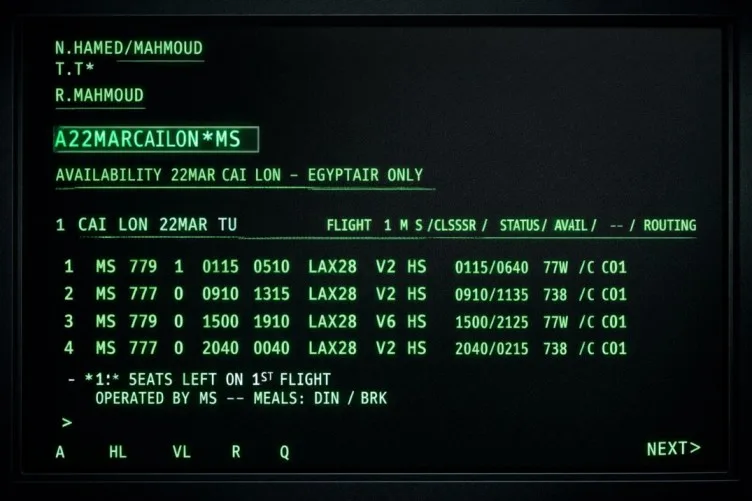
The Complete Galileo Command Set, Explained
Every Galileo command follows a short, consistent syntax — but only after you’ve typed it enough times for the pattern to click. This guide covers the full command surface: availability, sell, name, phone, ticketing, received-from, end-and-retrieve, fare quote, and ticketing.
- Availability and schedule displays (
A) - Selling segments (
01Y1) - PNR elements — name, phone, ticketing, RF
- End and retrieve (
ER) - Fare quote (
FQ) and ticketing (TKP)
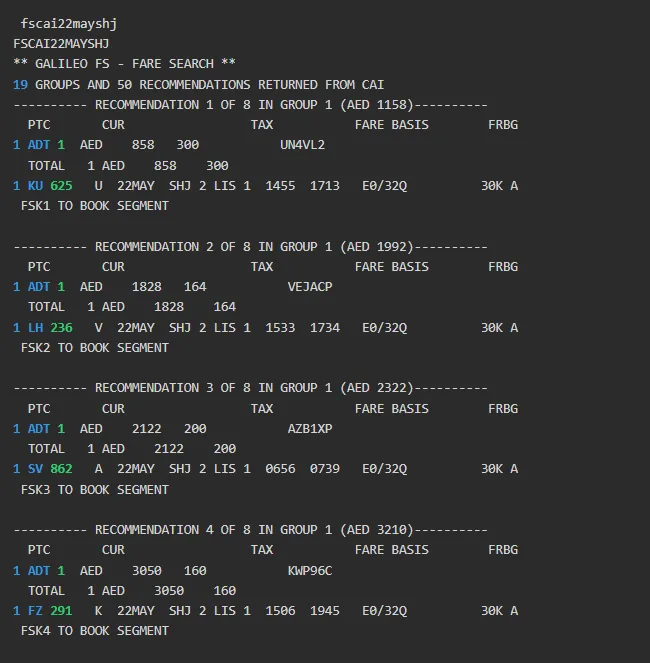
Find the Best Price with Galileo FS
FS (Fare Shopping) is Galileo’s signature best-fare search. Instead of pricing one itinerary at a time, FS scans multiple airlines and fare families in a single query — surfacing the cheapest bookable option. It’s the fastest way to turn a “find me the cheapest flight” request into a confirmed booking, and it’s a core part of our Galileo training program.
- Search across multiple airlines in one query
- Compare fare families side by side
- Identify the cheapest bookable option instantly
- Lock in the fare and ticket with
TKP
FS in fare shopping is the search command. Inside ticketing, TKPFS uses FS as the cash payment method. And /Z0 declares zero airline commission. Three different things — same letters.
Galileo Training in Four Practical Stages
Our Galileo training simulator takes you from reading your first availability screen to issuing a ticketed PNR — each stage builds on the last.
Read Availability
Learn to interpret Galileo’s availability screens — class buckets, flight numbers, and connection windows.
Sell & Build PNR
Practise selling segments with 01Y1, then add names, phone, ticketing, and received-from.
Price & Shop
Run FQ for a fare quote, then use FS to compare across airlines and find the best price.
Ticket & Service
Issue with TKPFS/Z0, then handle the servicing side: reissues, refunds, and queues.
Two Galileo Skills Worth Mastering First
Passenger types and flight availability are the foundation of every Galileo booking — get them right and everything else follows.
Search Flights in Galileo — Beyond the Basics
Galileo’s availability display is compact but information-dense. Our detailed guide walks through every column — airlines, flight numbers, classes, times, equipment, and connections — so you can read a screen at a glance the way working agents do.
- Direct vs connecting segment identification
- Cabin class buckets (Y / B / M / etc.)
- Time-zone-safe time reading
- Equipment codes and aircraft types
Adding Passengers in Galileo — ADT, CHD, INF, INS
Every passenger type has its own name-entry suffix in Galileo. Mixing them up is one of the most common beginner mistakes — and the fastest way to get a PNR rejected at ticketing. Our guide breaks down each type with example commands.
- ADT — Adult (standard fare)
- CHD — Child (age-band pricing)
- INF — Infant (lap-held)
- INS — Infant occupying a seat
Every Galileo Skill You’ll Practise
From first availability display to the final ticket — the full Galileo training lifecycle, structured end to end.
Take the Galileo Advanced Exam — Practical 2026 Certification Test
Ready to prove your skills? Our Galileo Advanced Exam is a practical, scenario-based test built for real agency work — not abstract theory. It covers the workflows that actually matter on the desk: fare shopping with FS, PNR servicing, reissues, refunds, queue handling, and ticketing.
- Scenario-based — mirrors real agency tasks
- Covers FS, reissues, refunds, and ticketing
- Updated for 2026 Travelport workflows
- Instant feedback after each section
Build a Complete Galileo PNR — Step by Step
Follow the exact command sequence working agents use to build a PNR from scratch: availability, segment sell, passenger name, phone, ticketing, received-from, and end-and-retrieve. Then price it with FQ and issue it with TKP.
A— read availability01Y1— sell the segmentN.— add the passengerER— end and retrieve the PNR
Explore the Full Galileo Library
Beyond Galileo training — practical guides for real desk workflows: group Umrah ticketing, currency conversion, INS bookings, and more.
Issue a Group Umrah Ticket on Galileo (EgyptAir)
Complete workflow: claim the PNR, add group passenger names, build the fare manually, and issue with TKPFS — including the /Z0 zero-commission qualifier for group fares.
GDS Currency Conversion — Amadeus, Sabre & Galileo
Convert currencies, check historical rates, and read IATA ROE tables across all three GDS platforms — the exact commands agents use every day.
Read the guide ProductivityGDS Calculator Commands — Math Inside the Terminal
Galileo uses the XX prefix for in-terminal math. Add, subtract, multiply, and divide without ever opening a calculator app.
Infant with a Seat (INS) Booking Guide
INS is not the same as INF. Learn the exact Galileo name-entry suffix for INS and the mandatory SSR with date of birth.
Read the guide Fare ShoppingGalileo FS Command — Master Fare Shopping
The full FS fare-shopping reference: one-way, round-trip, multi-city, airline filters, cabin classes, and no-penalty fares — all in one entry.
Read the guide Browse AllEvery Galileo Guide on GDS Hub
The full Galileo category — command references, ticketing walkthroughs, troubleshooting, and real-world agency workflows.
Browse the libraryGalileo Articles to Go Deeper
Practical, command-level guides from the blog — written by working travel agents for working travel agents.
Galileo GDS Guide — Smart Agent Secrets
The complete Galileo command reference, with the small tricks and shortcuts that separate efficient agents from stressed ones.
Read the guide → Fare ShoppingGalileo FS Command — Master Fare Shopping
Learn FS inside Smartpoint: how to compare fares across airlines, spot the cheapest bookable option, and ticket without re-quoting.
Read the guide → Passenger TypesAdd Passenger Types in Galileo — ADT, CHD, INF, INS
Every passenger type and how to enter it correctly the first time — with example commands for each category.
Read the guide → AvailabilitySearch Flights in Galileo — Availability Tutorial
Read availability displays with confidence: classes, buckets, connections, and the small details that matter when selling.
Read the guide →Frequently Asked Questions About Galileo Training
1What is Galileo GDS used for?
Galileo is Travelport’s Global Distribution System — used by travel agencies, airlines, and corporations to search, book, and ticket flights, hotels, and car rentals. Galileo training is one of the highest-value skills in travel, because it powers reservations across North America, the Middle East, and parts of Europe and Asia.
2Is the Galileo training simulator free?
Yes — GDS Hub offers a completely free Galileo training simulator. Create a free account at gdshub.pro/account and start practising Galileo commands in your browser immediately. No credit card required.
3What is FS fare shopping in Galileo?
FS (Fare Shopping) is Galileo’s best-fare search that scans multiple airlines and fare families at once to surface the cheapest available price. During Galileo training on GDS Hub, you can practise FS and then ticket with TKP to lock in the shopped fare. See our FS fare shopping guide for the full workflow.
4What do TKP, FS and Z0 mean in Galileo ticketing?
TKP is the issue command. FS inside TKP is the cash payment method (not the fare-shopping command). Z0 declares zero airline commission. So TKPFS/Z0 means: issue the ticket, paid in cash, with zero commission from the airline — a very common qualifier in agency ticketing workflows.
5How do I add different passenger types in Galileo?
Galileo uses name-entry suffixes to identify passenger types: ADT for adults, CHD for children, INF for infants (lap-held), and INS for infants occupying a seat. Galileo training on GDS Hub lets you practise each one with real name-entry commands — or read our passenger types guide for example commands.
6Can I practice flight availability in the Galileo simulator?
Absolutely. Galileo availability is triggered with the A command — for example A20NOVCAILHR. The Galileo training simulator displays live-style availability screens with class buckets, so you can practise reading the display and selling segments with 01Y1.
7Is Galileo the same as Travelport?
Galileo is a product of Travelport. Travelport is the parent company; Galileo is the GDS platform itself. In day-to-day work, agents use the names interchangeably — “Galileo” is the terminal you log into during Galileo training and on the job.
8How is Galileo different from Amadeus?
Both are Global Distribution Systems. Galileo (Travelport) is stronger in North America and some Middle East markets; Amadeus dominates Europe and Africa. Command syntax differs significantly — for example, Galileo uses ER (End and Retrieve) to save a PNR while Amadeus uses ET (End Transaction).
9What does the Galileo advanced exam cover?
The Galileo Advanced Exam tests practical workflows: FS fare shopping, reissues, refunds, queues, ticketing, PNR servicing, and complex itineraries. It’s designed for agents who complete Galileo training and are preparing for real agency work or Galileo certification.
Ready to Start Your Galileo Training?
Join thousands of agents who use GDS Hub for Galileo training — practise Galileo commands, prepare for the advanced exam, and build real Travelport skills. Free, browser-based, and available 24/7. Learning more than one GDS? Try the free Amadeus training simulator and the Sabre training simulator too.