Revalidation vs Reissue in Amadeus, Sabre & Galileo: Complete Guide
In Amadeus, Sabre, or Travelport Galileo, you typically deal with either Reissue or Revalidation when making modifications to an issued ticket. Despite their similar sounds, these two terms are crucial to a ticket agent’s daily work — and confusing them can lead to costly ADMs, wrong fares, and compliance issues with airlines.
This guide explains exactly what each one means, when to use them, and how to check whether an airline allows revalidation before you commit to a modification.
What Is Revalidation?
Revalidation means updating the existing ticket without issuing a new one. The ticket number stays the same, and there is no full fare recalculation.
Think of it as a technical correction — the system updates the flight details on the ticket to match the PNR, but the underlying financial document remains unchanged.
When to Use Revalidation
Revalidation is typically used in the following situations:
1. Schedule Change
If the airline changes the flight as indicated by the PNR, but the original flight remains indicated on the ticket, it may be necessary for the ticket to be revalidated. This keeps the ticket in sync with the new schedule without any financial impact.
2. Class Upgrade (in Some Airlines)
Sometimes, when upgrading to a higher booking class, revalidation is allowed instead of reissuing the ticket. This depends entirely on airline policy — some carriers allow it, others require a full reissue.
3. Restoring a Segment Cancelled by Mistake
If a segment was removed accidentally and then added back, revalidation might solve the mismatch — but again, only if the airline supports it.
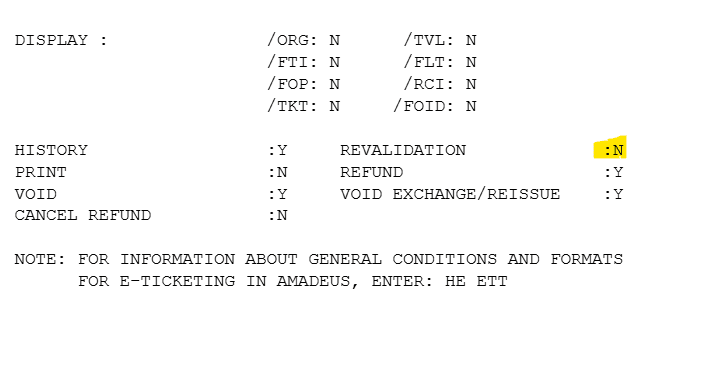
Checking Revalidation with HEETTMS in Amadeus
In Amadeus, you can verify whether an airline permits revalidation using the following command:
The system returns the airline’s revalidation policy, confirming whether revalidation is permitted and under which conditions. Always run this check before attempting to revalidate a ticket — it takes seconds and protects you from ADMs.
What Is Reissue?
Reissue is different. It means you are financially rebuilding the ticket. A brand-new ticket document is issued, replacing the old one entirely.
In these cases, the system recalculates the fare. There may be a fare difference, and a change penalty may apply. A new ticket is issued financially with a new ticket number.
Reissue is not just a correction — it’s a full ticket adjustment that affects the financial record of the booking.
When to Use Reissue
You must reissue when the passenger requests changes that affect pricing or routing, such as:
- Changing the flight number (when it affects the fare or routing)
- Modifying the route — different origin, destination, or connections
- Changing travel time beyond permitted limits for the fare
- Changing the date outside the original fare conditions
In all of these scenarios, the fare is recalculated, any penalty is applied, and the difference (if any) is collected from the passenger before the new ticket is issued.
Revalidation vs Reissue – Side-by-Side Comparison
🔄 Revalidation
- Ticket number stays the same
- No fare recalculation
- Technical update only
- No penalty applied
- Used for schedule changes
- Only if airline allows it
- No new ticket document
💰 Reissue
- New ticket number issued
- Full fare recalculation
- Financial reprocessing
- Change penalty may apply
- Used for route/date/class changes
- Always permitted when fare rules allow
- New ticket document issued
| Aspect | Revalidation | Reissue |
|---|---|---|
| Ticket Number | Unchanged | New number issued |
| Fare Recalculation | No | Yes |
| Penalty / Fare Difference | Not applicable | May apply |
| Typical Use Case | Schedule change, class upgrade | Route change, date change, flight change |
| Airline Approval | Required (check via HEETTMS) | Governed by fare rules |
| Financial Impact | None | Possible cost |
In Simple Terms
Reissue = financial reprocessing.
Knowing when to use each one saves time, avoids ADM risks, and keeps your ticketing clean and compliant. Whenever you’re unsure whether an airline allows revalidation, check it first with HEETTMS in Amadeus before you touch the ticket.
Frequently Asked Questions
What is the difference between revalidation and reissue?
When should I revalidate a ticket instead of reissuing it?
What command checks if an airline allows revalidation in Amadeus?
When is a reissue required?
What is the risk of not knowing when to revalidate vs reissue?
Practise Revalidation & Reissue in a Real GDS Simulator
Create a free GDS HUB account and practise ticket modifications, HEETTMS checks, and reissue workflows in Amadeus, Sabre, and Galileo — no live data, no risk.
Start Practising Free →


