-

How to Add Passenger Types in Galileo GDS
Correctly entering passenger types is one of the most fundamental skills in any Galileo GDS workflow. A single error in passenger categorization can cause ticketing failures, seat mismatches, and costly rebooking fees. This guide walks you through every passenger type, the exact commands you need, and the rules you must never break. Watch the…
-
CANCEL SEAT ITEM OR SPLIT PNR PRIOR TO NAME RE-ENTER
A practical guide for travel agents on fixing the CANCEL SEAT ITEM OR SPLIT PNR PRIOR TO NAME RE-ENTER error when changing a passenger name in a Group PNR. The CANCEL SEAT ITEM OR SPLIT PNR PRIOR TO NAME RE-ENTER error is a common Amadeus PNR error that appears when an agent tries to…
-

How to Master Galileo Encode & Decode Commands
Table of Contents Introduction What Is Encode & Decode? Encode Commands in Galileo Decode Commands in Galileo Why It Matters Quick Reference Table Frequently Asked Questions How to Master Galileo Encode & Decode Commands (.CE, .CD, .AE, .AD, .LE, .LD) 📅 Updated: October 2026 ⏱ 6 min read ✈️ GDS HUB Editorial When working…
-
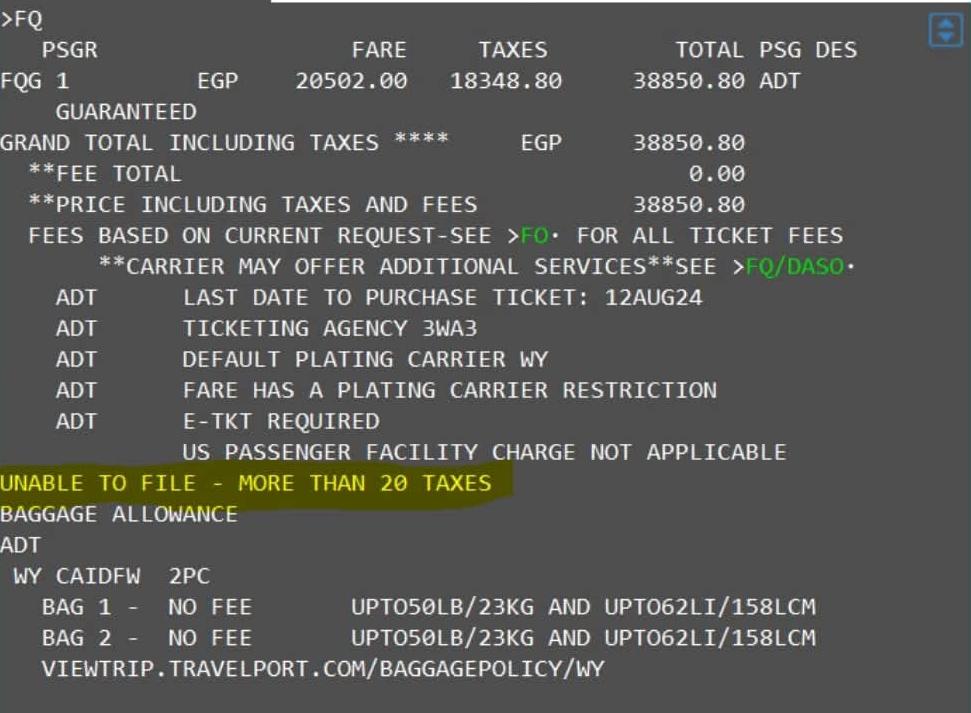
How to Handle More Than 20 Taxes in Galileo GDS
Table of Contents Introduction Step 1: Normal Pricing Step 2: Start Manual Fare Build Step 3: Add Taxes (The Problem & Solution) Step 4: Save Fare Step 5: Display Fare Step 6: Ticket Issuance Important Warning Quick Reference Table Frequently Asked Questions How to Handle More Than 20 Taxes in Galileo GDS: Manual Fare…