GDS Training Simulator for Amadeus, Galileo & Sabre
The GDS Training Simulator from GDS HUB gives you a fully interactive Amadeus, Galileo & Sabre environment running directly in your browser. Build real PNRs, price itineraries, issue tickets and run queues — with zero live data, zero risk, and zero cost.
What Is the GDS Training Simulator?
The GDS Training Simulator replicates the exact command-line environment used by travel agencies, airlines and consolidators around the world. Every command you type — from availability displays to ticketing — returns an authentic response, just like a real terminal.
Whether you are a student preparing for your first job, a travel agent refreshing your skills, or a trainer building a team, this simulator gives you unlimited, risk-free practice with real GDS workflows.
Who Is This GDS Training Simulator For?
Our simulator is designed for travel and tourism students, new agency hires, experienced agents expanding into new GDS platforms, and instructors running classroom exercises.
- Real Amadeus, Galileo & Sabre command responses
- Full PNR lifecycle — create, price, ticket & cancel
- Seat maps, SSR services and queue management
- 100% safe — no live data, no financial impact
- Access from any device, anywhere in the world
Why Use a GDS Training Simulator?
Practising on a live GDS costs money, risks real bookings, and requires formal access. A training simulator removes every barrier — so you can focus 100% on learning.
Zero Cost, Zero Risk
Real GDS terminals charge per transaction and require certified access. Our simulator is completely free and safe for unlimited practice.
Learn by Doing
Reading commands is not enough. Typing them, seeing the response, and correcting mistakes is how you truly master the GDS.
Real Command Responses
Every response mirrors the real system — including error messages, warnings, and confirmation lines — so you build real reflexes.
5 Steps to Master GDS Training
Follow these five steps inside the GDS Training Simulator and you will go from complete beginner to confidently issuing tickets.
Create Your Free Account
Sign up in seconds and log in to the GDS Training Simulator from any browser — no installation, no downloads.
Search for Flights
Use AN to display availability and SN to view schedules. Learn how to read class codes, flight numbers and timings. See our Amadeus FXD guide for finding the best airfare.
Build a PNR
Add passengers with NM1, sell segments with SS, insert contact details with AP, and finalise with ER.
Price and Ticket
Run FXP to price the itinerary, review the fare rules, then issue the ticket with TTP and produce a real ticket report.
Get Certified
Take the Amadeus Basics or Advanced Exam inside the simulator and earn a certificate you can share with employers.
GDS Training Simulator Screens
Every screen inside the GDS Training Simulator looks and behaves like the real system — from PNR creation to pricing, seat maps and ticket reports.
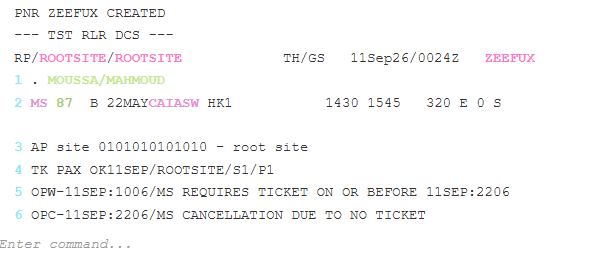
Create a PNR
Add passengers, book segments, insert contacts and finalise the record — exactly as you would on a live terminal.
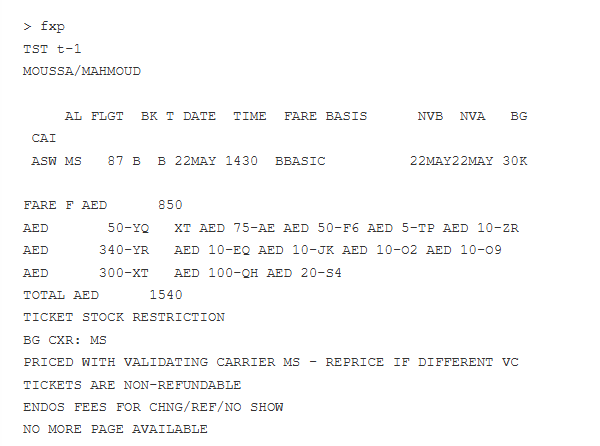
Price the Itinerary
Run FXP, FXB and follow the fare rules to get real pricing results with taxes and total amounts.
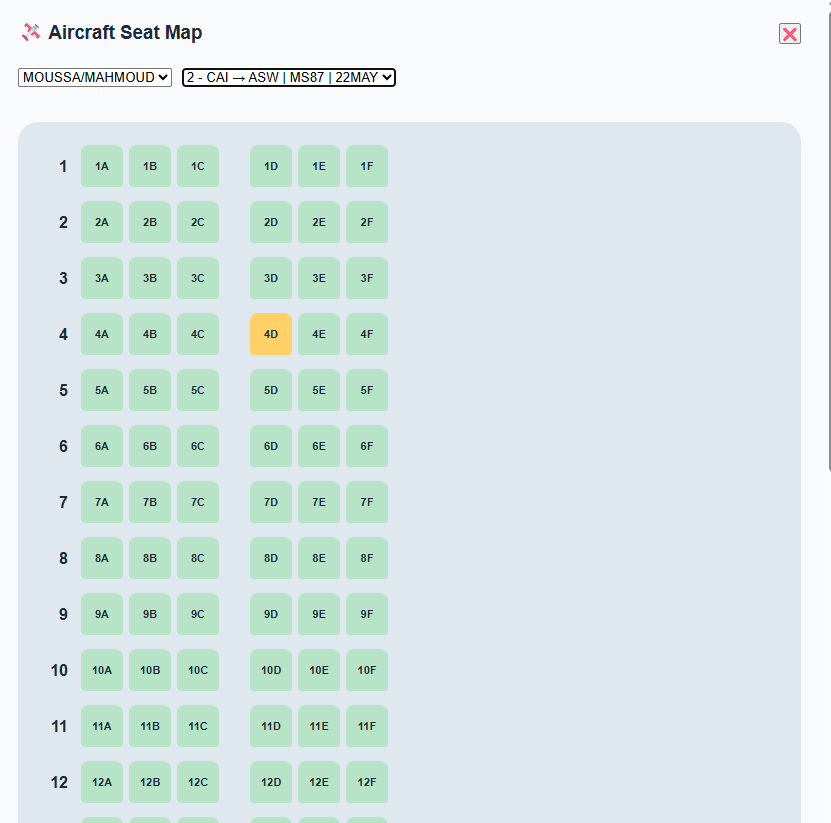
Assign Seats
Display seat maps and assign preferred seats using the standard ST and SM commands.
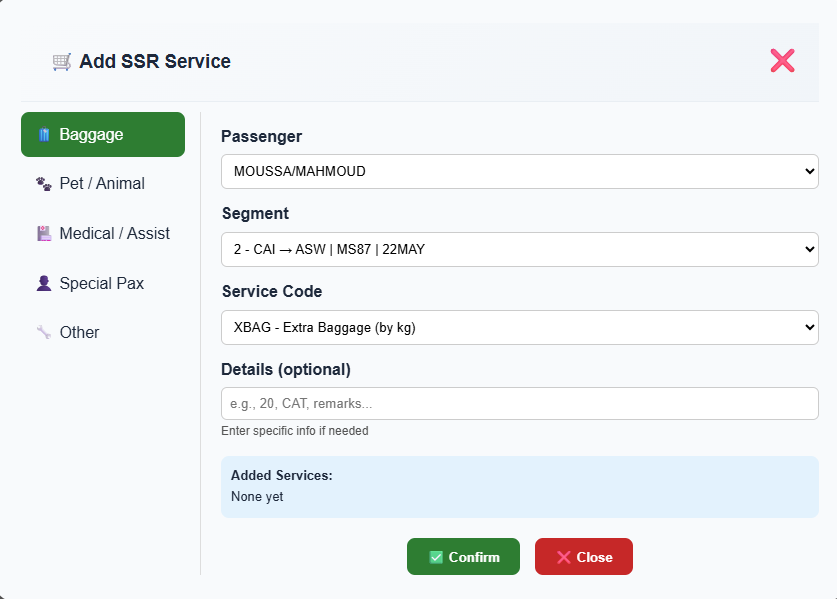
Add Special Services
Insert SSRs for meals, wheelchairs, extra baggage and more — with the correct codes.
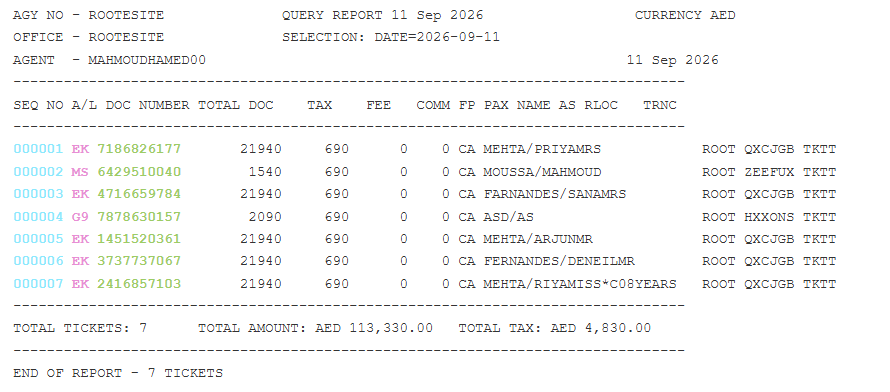
Issue Tickets
Complete the ticketing flow with TTP and produce a real ticket report — ready for your portfolio.
GDS Training Simulator – Live Terminal Demo
Type a command, get a response. Below is a real example of a full booking flow inside the GDS Training Simulator — from availability to a completed PNR.
Animated demonstration showing commands such as an22maycaiasw/ams, ss1b1, nm1moussa/mahmoud, er and their authentic system responses inside the GDS Training Simulator.
GDS Training Certification Exams
Test your knowledge and earn a certificate you can showcase to employers. Both exams run entirely inside the GDS Training Simulator — no extra software needed.
Amadeus Basics Exam
Perfect for students and new agents. Covers the essential commands you will use every day in a travel agency.
- Encode & decode cities, airlines and aircraft
- Availability displays and selling segments
- Building a complete PNR from scratch
- End transaction, pricing and ticketing
Amadeus Advanced Exam
For experienced agents who want to prove mastery of complex fare rules, queues, reissues and refunds.
- Advanced fare rules & reissue workflows
- Queue management and PNR servicing
- Complex SSR and OSI handling
- Refunds, exchanges and manual TSTs
Frequently Asked Questions
Quick answers to the questions we hear most often from new GDS learners and travel agents.
How can I learn GDS for free?
You can learn GDS for free using the GDS Training Simulator on GDS HUB. It provides a fully interactive Amadeus, Galileo and Sabre environment in your browser at no cost — with real command responses, PNR building, pricing, ticketing and free certification exams. To get started, follow our How to Create a PNR in Amadeus guide while you practice inside the simulator.
How long does it take to learn Amadeus?
With daily practice inside the GDS Training Simulator, most beginners can build and price a PNR confidently in 1–2 weeks. Full mastery of advanced commands such as reissues, refunds and queue management typically takes 4–8 weeks of regular practice. Our Amadeus Queues guide and Manual Refund walkthrough are excellent next steps once you have the basics.
Is the GDS Training Simulator really free?
Yes. Creating an account is completely free, and you can run unlimited PNR practice sessions, price itineraries, issue tickets and take the certification exams at no cost.
Do I get a certificate after completing GDS training?
Yes. After passing the Amadeus Basics or Amadeus Advanced Exam inside the simulator, you receive a shareable certificate that you can add to your CV or LinkedIn profile.
Can I practice PNR creation without a real GDS account?
Yes. The GDS Training Simulator provides an authentic Amadeus environment inside your browser — no live GDS access, no certification, and no travel agency account is required. Start with our passenger name (NM) and save PNR lessons to build your first record.
Ready to Start Your GDS Training?
Create your free account and get instant access to the GDS Training Simulator. Build your first PNR, price a flight, issue a ticket — and take your certification exam when you are ready. You can also explore the Amadeus encode & decode reference to speed up your learning, read our frequent flyer guide, or check the official Amadeus documentation for deeper technical details.
Create Account & Start Training →Already have an account? Sign in here