How to Issue EMD Services in Amadeus & Galileo: Complete Step-by-Step Guide
How to issue EMD services in Amadeus and Galileo is a must-know skill for travel agents. Whether you’re adding baggage, seats, meals, or other paid services, knowing the correct commands ensures your PNRs are accurate and compliant.
In this guide, we will show you exactly how to issue EMD services in both Amadeus and Galileo, with real examples and tips for daily ticketing tasks.
Working With EMD Services in Amadeus
When you want to check what services the airline offers for the passenger, here’s the usual flow most agents follow.
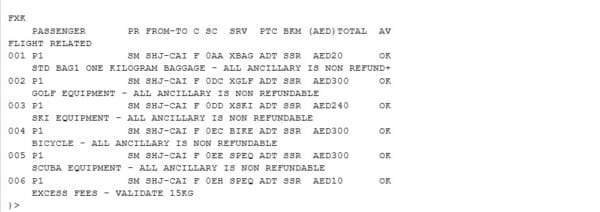
1. View All Available Services
2. Choose a Service and Let Amadeus Create the TSM
3. Display the TSM to Review It
4. Add Your Form of Payment
5. Save Your Actions
6. Issue the EMD
That’s it — the EMD is issued and linked to the PNR.
TTM (without specifying a TSM number). To issue only specific TSMs, use TTM/M1,3,5 where 1, 3 and 5 are the TSM numbers.
Handling Paid Services in Galileo
Galileo’s flow is slightly different but just as straightforward.
1. Display Available Services
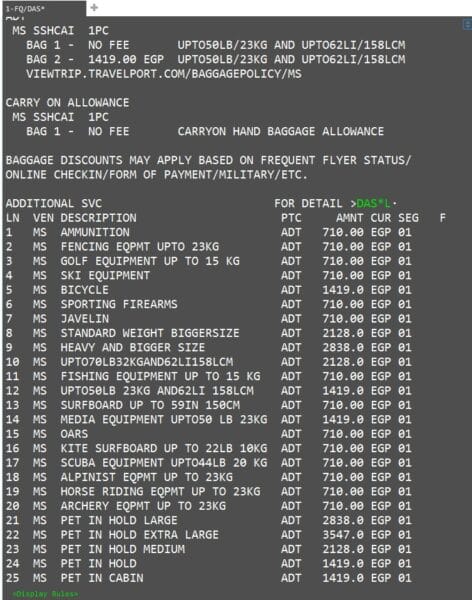
2. View More Details About a Specific Service
3. Choose a Service from the List
4. Save Your PNR
5. Display the Saved Service
6. Issue the EMD
EMD Command Comparison
Here is a side-by-side comparison of the EMD commands in Amadeus and Galileo.
| Action | Amadeus | Galileo |
|---|---|---|
| Display services catalogue | FXK | FQ/DAS |
| View service details | (from FXK display) | DAS*L1 |
| Select a service | FWK3 | DAS01L1 |
| Display TSM / saved service | TQM | *DAS |
| Add form of payment | TMI/M1/FP-CASH | (included in EMDI command) |
| Save the PNR | RFPAX+ER | R.PAX+ER |
| Issue the EMD | TTM/M1 | EMDI/SM1/ICticket/FS |
Important Notes for Agents
- Name match: The passenger name on the EMD must exactly match the name on the associated e-ticket. Mismatched names can cause check-in problems or rejected EMDs.
- IC field: Always enter the correct e-ticket number in the
IC(Issued in Connection with) field for EMD-A. Without it, the airline cannot associate the ancillary service with the correct ticket. - SSR confirmation: Some services (like extra baggage or special meals) must be confirmed via SSR before the EMD can be issued. Check the service status — it should be
HKorKK. - Airline authorization: Certain services require advance airline approval. For example, unaccompanied minors (UMNR) and sports equipment often need airline confirmation before EMD issuance.
- EMD-A vs EMD-S: Use EMD-A for flight-related services (baggage, seats, meals). Use EMD-S for standalone fees (rebooking penalties, group deposits, residual value).
- Void and refund: EMDs can be voided on the same day of issuance using
TRDC(Amadeus) orEMDV(Galileo). After the void window closes, a refund must be processed. - Commission: EMD issuance may or may not include agency commission. Check the airline’s policy and the TSM/TST record for commission details.
Quick Reference Table
Bookmark this table for quick access during your daily work.
| GDS | Command | Purpose |
|---|---|---|
| Amadeus | FXK | Display ancillary services catalogue |
| Amadeus | FWK3 | Select service line 3 — creates TSM |
| Amadeus | TQM | Display TSM for review |
| Amadeus | TMI/M1/FP-CASH | Add form of payment to TSM 1 |
| Amadeus | RFPAX+ER | Save the PNR |
| Amadeus | TTM/M1 | Issue EMD against TSM 1 |
| Galileo | FQ/DAS | Display services catalogue |
| Galileo | DAS*L1 | View details of service line 1 |
| Galileo | DAS01L1 | Select service line 1 for passenger 1 |
| Galileo | R.PAX+ER | Save the PNR |
| Galileo | *DAS | Display saved service |
| Galileo | EMDI/SM1/ICticket/FS | Issue EMD-A |
Frequently Asked Questions
What is an EMD in airline ticketing?
What is the FXK command in Amadeus?
What does FWK3 do in Amadeus?
What is the TTM command in Amadeus?
TTM/M1 is the Amadeus command used to issue an EMD against a TSM record. M1 refers to TSM number 1. Before issuing, you must add the form of payment using TMI/M1/FP-CASH and save the PNR with RFPAX+ER.What is the FQ/DAS command in Galileo?
DAS*L1 to view more details about a specific service line.How do I issue an EMD in Galileo?
FQ/DAS and selecting one with DAS01L1, save the PNR with R.PAX+ER. Then issue the EMD using EMDI/SM1/ICticketnumber/FS, where SM1 is the service segment number, IC is the associated ticket number, and FS is the form of payment (cash).What is the difference between EMD-A and EMD-S?
Do I need airline approval before issuing an EMD?
📚 Related Guides
Practise EMD Issuance in a Safe Simulator
Create a free GDS HUB account and practise FXK, FWK3, TQM, TTM and EMDI commands in a simulated Amadeus or Galileo environment — no live data, no risk.
Start Practising Free →


