How to Void a Ticket in Amadeus: Same-Day Cancellation Guide
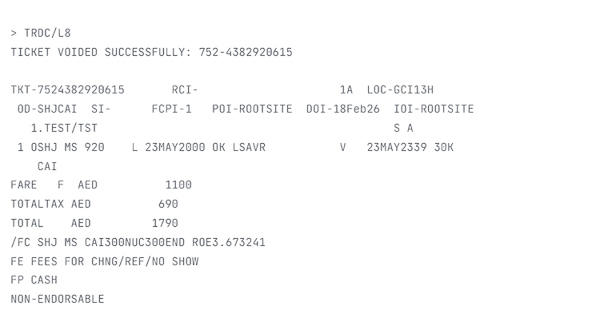
When working on the Amadeus system, you may sometimes need to cancel a ticket that was issued by mistake — wrong name, wrong date, incorrect fare, or duplicate issuance.
In this case, you can process a Void, which cancels the ticket on the same day of issuance before the sales report is closed. If done within the allowed time, the ticket is removed from sales without going through the refund process.
Step 1: Display the Daily Report
First, check the issued tickets in your sales report:
This command displays the daily report where you can see:
- Ticket numbers — the document number column
- Line numbers — the sequence number column (SEQ NO)
- Passenger names — the PAX NAME column
- Record locators — the RLOC column
- Transaction types — TKTT (ticket), EMDS/EMDA (EMD)
Step 2: Process the Void (TRDC)
There are three ways to void a ticket in Amadeus, depending on the information you have available.
1. Void by Ticket Sequence Number (From the Report)
Replace 5033 with the ticket sequence number shown in the SEQ NO column of the TJQ report.
2. Void by Line Number
Replace 3 with the correct line number from the report. This is useful when you can see the line in the report but do not want to type the full ticket sequence.
3. Void by Ticket Number (Last 10 Digits)
If you have the ticket number, you can use the last 10 digits. Example: TRDC/TK-0574373759483.
OK - DOCUMENT(S) CANCELLED. The ticket is removed from the sales report and will not be settled.
Step 3: Check Airline Void Policy (HE ETT)
Before processing a void, always confirm that the airline allows it.
Replace XX with the airline code. This will display the electronic ticketing information and confirm whether void is permitted for that airline.
HE ETT entry for the relevant airline before attempting a void.
Important Notes
- Void must be processed on the same day of ticket issuance — before the sales report closes. For IATA BSP agencies, this is typically midnight local time.
- After report closure, you must process a refund (TRF) instead of void (TRDC).
- Always check airline rules before proceeding — use
HE ETTfor the specific airline. - Ensure the e-ticket record is voided before cancelling the itinerary to avoid inconsistencies in the PNR.
- Voids are final — there is no process to “unvoid” a ticket. If you void by mistake, a new ticket must be issued.
Understanding the void procedure in the Amadeus system helps travel agents avoid ADM charges, maintain accurate sales reports, and handle ticketing errors efficiently.
Quick Reference Table
Bookmark this table for quick access during your daily work.
| Command | Purpose | Example |
|---|---|---|
| TJQ | Display the daily sales report | TJQ |
| TRDC/ | Void by ticket sequence number from the report | TRDC/5033 |
| TRDC/L | Void by line number from the report | TRDC/L3 |
| TRDC/TK- | Void by last 10 digits of ticket number | TRDC/TK-0574373759483 |
| HE ETT | Check airline electronic ticketing void policy | HE ETT MS |
| TRF | Process a refund (after report closure) | TRF/L5/ATC |
Frequently Asked Questions
What is the TRDC command in Amadeus?
TRDC/5033), a line number from the sales report (TRDC/L3), or the last 10 digits of the ticket number (TRDC/TK-0574373759483). The system replies OK – DOCUMENT(S) CANCELLED when successful.What is the TJQ command in Amadeus?
What is the HE ETT command in Amadeus?
HE ETT followed by the airline code (e.g., HE ETT MS) to confirm whether the airline supports void and to review its specific void policy before processing a cancellation.When can I void a ticket in Amadeus?
What happens if I miss the void window in Amadeus?
Can I void a ticket by ticket number in Amadeus?
TRDC/TK- followed by the last 10 digits of the ticket number. For example: TRDC/TK-0574373759483. This is useful when you have the ticket number but do not have the sales report open.What does the OK – DOCUMENT(S) CANCELLED message mean?
Does voiding a ticket cost money?
📚 Related Guides
Practise Void Commands in a Safe Amadeus Simulator
Create a free GDS HUB account and practise TJQ, TRDC and HE ETT commands in a simulated Amadeus environment — no live data, no risk.
Start Practising Free →


