How to Handle More Than 20 Taxes in Galileo GDS: Manual Fare Build Guide
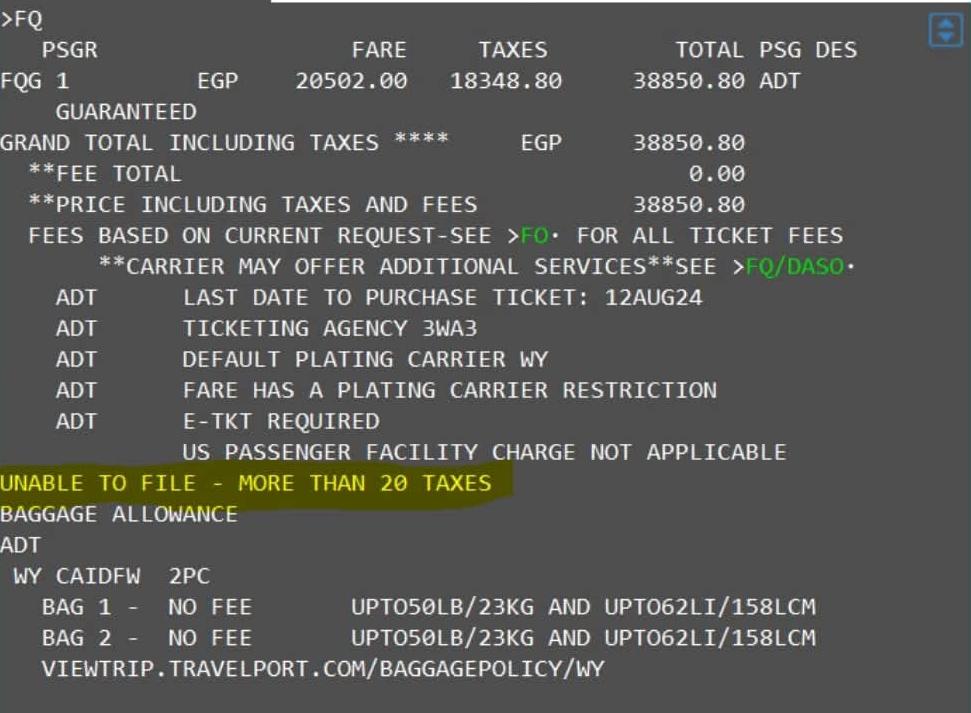
In the Galileo GDS system, there is a very important limitation: you cannot price or issue a ticket with more than 20 tax lines.
So if you have a case like this (21 taxes or more), the solution is to use a Manual Fare Build and combine some taxes. This guide walks you through the exact steps, from normal pricing to ticket issuance, using real command examples.
Step 1: Normal Pricing
Start with standard pricing to see what the system returns:
You will get:
- Base Fare
- Equal Fare (if available)
- Fare Calculation
- Taxes
Step 2: Start Manual Fare Build
1. Start Pricing
2. Add Fare
3. Add ROE
4. Fare Calculation
5. Fare Basis
6. Baggage
7. Remarks (Optional)
Step 3: Add Taxes (Most Important Step)
Add taxes one by one using the FBUTAX command:
At this point you already have 19 taxes.
The Problem
You still have:
- 8.35 TR
- 5.90 SY
That makes 21 taxes — not allowed.
Solution: Combine Taxes
You must merge them:
Then add them as one tax:
Step 4: Save Fare
Step 5: Display Fare
Step 6: Ticket Issuance
Important Warning
- Some taxes are mandatory and cannot be changed
- Combining taxes may affect auditing and reporting
- Each airline has its own policy
Quick Reference Table
Bookmark this table for quick access during your daily work.
| Command | Purpose |
|---|---|
| FQ | Price the itinerary |
| FQL | Display fare details |
| FBCCMS | Start Manual Fare Build for airline MS |
| FBUFARE/USD123 | Enter the base fare |
| FBUEQ/EGP456 | Enter equal fare |
| FBUROE/1.0 | Enter ROE |
| FBUFC/… | Enter fare calculation (copy from FQL) |
| FBUFB1/YEG3M | Enter fare basis |
| FBUBG/2PC | Enter baggage allowance |
| FBUEB/ANY TEXT | Add free-text remark |
| FBUTAX1/10.00XL | Add tax line 1 |
| FBUTAX20/14.25XP | Add combined tax as tax line 20 |
| FBUTTL/ | Save the fare total |
| FBFALL | Finalise fare build |
| R.MAHMOUD | Enter received from name |
| ER;ER | End and redisplay |
| *FF1 | Display saved fare |
| TKP1/FS/Z0 | Issue the ticket |
Frequently Asked Questions
What is the 20-tax limit in Galileo GDS?
How do I start a Manual Fare Build in Galileo?
FBCCMS (where MS is the airline code). Then add the fare components step by step: FBUFARE for the base fare, FBUEQ for the equal fare, FBUROE for the rate of exchange, FBUFC for the fare calculation, FBUFB for the fare basis, and FBUBG for baggage allowance.How do I combine taxes in Galileo when I have more than 20?
FBUTAX1/ through FBUTAX19/. Then merge two smaller taxes into a single entry for FBUTAX20/. For example, combine 8.35 TR and 5.90 SY into 14.25 XP (XP is an example code — always use the code provided by the airline).What does FBUTAX do in Galileo?
FBUTAX1/10.00XL adds a 10.00 tax with code XL.Why do I need airline approval before combining taxes?
What is the TKP1/FS/Z0 command in Galileo?
TKP1/FS/Z0 is the Galileo command used to issue a ticket after completing a Manual Fare Build. TKP1 initiates ticket issuance for passenger 1, /FS indicates a fare selection, and /Z0 specifies the form of payment (Z0 = cash or the default form of payment).What does FBUTTL/ do in Galileo Manual Fare Build?
FBUTTL/ is the Galileo command that saves the Manual Fare Build (TTL = total). After entering FBUTTL/, you must complete the transaction with FBFALL, enter the received from name, and end with ER;ER to permanently save the fare.📚 Related Guides
Practise Manual Fare Build in a Safe Simulator
Create a free GDS HUB account and practise FBCCMS, FBUTAX, FBUTTL and TKP1 commands in a simulated Galileo environment — no live data, no risk.
Start Practising Free →


