How to Check Minimum Connecting Time (MCT) in Amadeus, Galileo & Sabre
Minimum Connecting Time (MCT) is the minimum time required between two flights for a passenger to successfully connect at a specific airport. If the connection is below MCT, the itinerary is considered invalid and cannot be ticketed.
Whether you’re building a complex multi-city itinerary or validating a manually constructed connection, every GDS provides a dedicated command to check MCT. This guide covers the exact entries for Amadeus, Galileo, and Sabre with real-world examples.
Why MCT Matters
- Ensures the passenger can transfer between flights — the connection is physically possible within the airport
- Prevents missed connections — reduces the risk of stranded passengers and airline liability
- Required check before ticketing — most GDS systems block ticketing if MCT is violated
- Affects fare and routing validity — an invalid connection means the entire itinerary may be rejected
Amadeus MCT Commands
Check MCT with Existing Segments
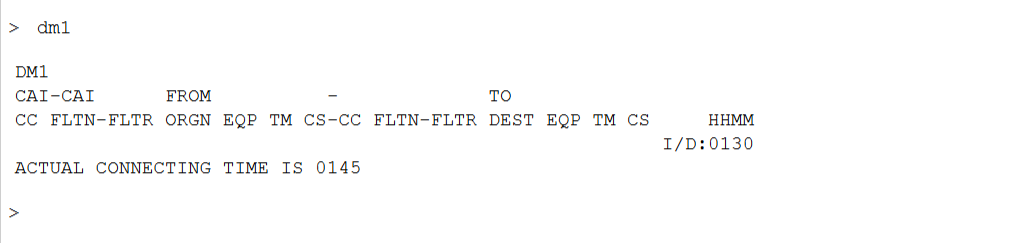
If you already have segments in the PNR, use the following command:
Example
Actual connecting time is 01:45 → This means the minimum required connection is 1 hour 30 minutes, and the current connection time is 1 hour and 45 minutes. The itinerary passes MCT validation.
Check MCT at a Specific Airport
You can also display the MCT for a specific airport without an active PNR:
If No Segments in the PNR
If the PNR has no segments yet, first display availability, then check MCT:
Check MCT Between Two Specific Segments
You can also check MCT between two specific segments in the PNR:
Galileo MCT Commands
Check MCT for an Itinerary
In Galileo (Travelport+), use @MT to validate MCT for an itinerary:
Check MCT Between Specific Segments
Example
Consider a three-segment itinerary: BLR → DEL (Dep: 06:10 / Arr: 08:55), then DEL → FRA (Dep: 13:40 / Arr: 18:40). The connection is valid (enough time).
Now add: FRA → LHR (Dep: 14:00 / Arr: 14:40 same day). The system returns an error:

Display MCT at a Specific Airport
To display the MCT at an airport without an active itinerary, use:
Connection type codes: DD = Domestic-to-Domestic, DI = Domestic-to-International, ID = International-to-Domestic, II = International-to-International.[reference:5]
Sabre MCT Commands
Verify MCT for All Connections
In Sabre, use VCT* to verify the MCT for all connections in the PNR:
Successful Response
If all connections meet the minimum required time, Sabre returns:
Invalid Connection Response
If a connection is below MCT, Sabre returns an error indicating which segments are affected and the minimum required time:
Check MCT Between Specific Segments
Quick Reference Table
Bookmark this table for quick access during your daily work.
| GDS | Command | Purpose |
|---|---|---|
| Amadeus | DM1 | Check MCT for segment 1 in a PNR |
| Amadeus | DM2/3 | Check MCT between segments 2 and 3 |
| Amadeus | DM BCN | Display MCT at a specific airport |
| Galileo | @MT | Validate MCT for all connections |
| Galileo | @MT1-2 | Check MCT between segments 1 and 2 |
| Galileo | DCTPDX-DD | Display MCT at airport for connection type |
| Sabre | VCT* | Verify MCT for all connections |
| Sabre | VCT*1-2 | Check MCT between segments 1 and 2 |
Frequently Asked Questions
What is Minimum Connecting Time (MCT)?
How do I check MCT in Amadeus?
DM followed by the airport code to display the MCT at that airport (DM BCN). If you have segments in a PNR, use DM1 to check the MCT for segment 1. You can also use DM2/3 to check between two specific segments.How do I check MCT in Galileo?
@MT to validate the MCT for an itinerary. To check a specific connection, use @MT1-2 for segments 1 and 2. The system returns either a valid confirmation or a CHECK DATE/TIME CONTINUITY error if the connection is too short.How do I check MCT in Sabre?
VCT* to verify the MCT for all connections in the PNR. A successful result shows MINIMUM CONNECT TIME EDIT VALID FOR ALL CONNECTIONS. If a connection is invalid, Sabre returns INVALID CONNECT TIME SEGS 1 AND 2 with the minimum required minutes.What happens if the connection is below MCT?
Why is MCT important for travel agents?
Can MCT vary by airline and airport?
📚 Related Guides
Practise MCT Checks in a Safe Simulator
Create a free GDS HUB account and practise DM, @MT and VCT* commands in a simulated Amadeus, Galileo or Sabre environment — no live data, no risk.
Start Practising Free →


