-

Amadeus Lesson 6: How to price a PNR(FXX, FXP, FXR & FXB)
Related Guides : Amadeus Lesson 5: How to add a Frequent Flyer Card (FFN & SR) Amadeus lesson 4: how to add Contact Information (AP&SR) Amadeus lesson 3: Ticketing Arrangement & Save PNR Linkedin
-
Amadeus Lesson 5: How to add a Frequent Flyer Card (FFN & SR)
Related Guides : Amadeus lesson 4: how to add Contact Information (AP&SR)Amadeus lesson 3: Ticketing Arrangement & Save PNR Amadeus lesson 2: How to add Passenger Names (NM) Linkedin
-
Amadeus lesson 4: how to add Contact Information (AP&SR)
Related Guides : Amadeus lesson 2: How to add Passenger Names (NM)Split PNR Commands in Amadeus, Galileo, and SabreHow to clone PNR in Amadeus , Galileo and saber Linkedin
-
Amadeus lesson 3: Ticketing Arrangement & Save PNR
Related Guides : Amadeus lesson 2: How to add Passenger Names (NM)Split PNR Commands in Amadeus, Galileo, and SabreHow to clone PNR in Amadeus , Galileo and saber Linkedin
-
Amadeus lesson 2: How to add Passenger Names (NM)
Split PNR Commands in Amadeus, Galileo, and Sabre – GDS HUB How to clone PNR in Amadeus , Galileo and saber – GDS HUB how to send Itineraries via Amadeus, Galileo, Sabre – GDS HUB Linkedin
-
Split PNR Commands in Amadeus, Galileo, and Sabre
Splitting a PNR allows travel agents to separate one or more passengers from the original booking into a new reservation. Below is a quick reference table for Split PNR commands in Amadeus, Galileo, and Sabre. Action Command Divide one passenger DP1 Divide multiple passengers DP1-3.6 Divide unnamed group passengers DG/10 Divide named and unnamed…
-

How to clone PNR in Amadeus , Galileo and saber
Copying or cloning a PNR is one of the most useful functions in any GDS system. Travel agents use these commands to duplicate itineraries, copy passenger information, or create new bookings faster without re-entering all details manually. This quick guide covers the most common PNR copy commands in Amadeus, Galileo, and Sabre. Amadeus PNR…
-
how to send Itineraries via Amadeus, Galileo, Sabre
Travel agents handle hundreds of PNRs daily, so using the correct GDS commands is essential for saving time and avoiding mistakes. This guide covers commonly used commands in Amadeus, Galileo, and Sabre for sending itineraries and displaying ticket PDFs. Amadeus Send itinerary without price Display itinerary PDF in browser (without price) Send itinerary for…
-
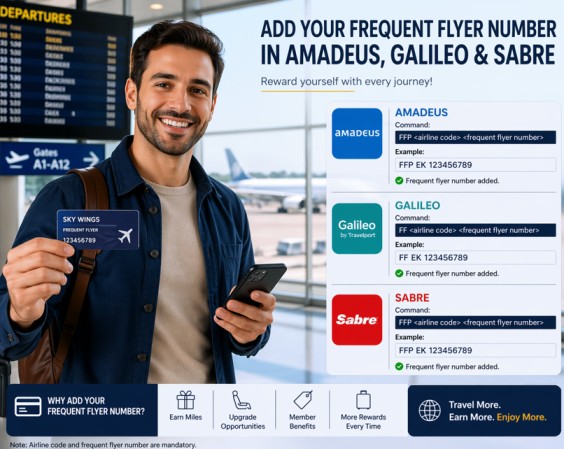
How to Add a Frequent Flyer in Amadeus, Galileo & Sabre
Let’s be honest – adding a frequent flyer number to a booking should be easy, but every GDS does it differently. I’ve been there. You have a passenger standing in front of you, and they say:“I want to earn miles on this flight.” Here’s how you actually do it in Sabre, Galileo, and Amadeus – without…
-
How to add Passport Data in Amadeus Galileo Sabre
Target Audience: Travel Agents, Airline Ticketing Staff, GDS Users Linking a passenger’s passport information to their booking (PNR) is mandatory for international flights. Each Global Distribution System (GDS) uses a slightly different command. Below is a quick, practical guide for Amadeus, Galileo, and Sabre. 1. Amadeus – Format Use the command SRDOCS followed by the details. The structure is: SRDOCS<airline…