Let’s be honest – adding a frequent flyer number to a booking should be easy, but every GDS does it differently.
I’ve been there. You have a passenger standing in front of you, and they say:
“I want to earn miles on this flight.”
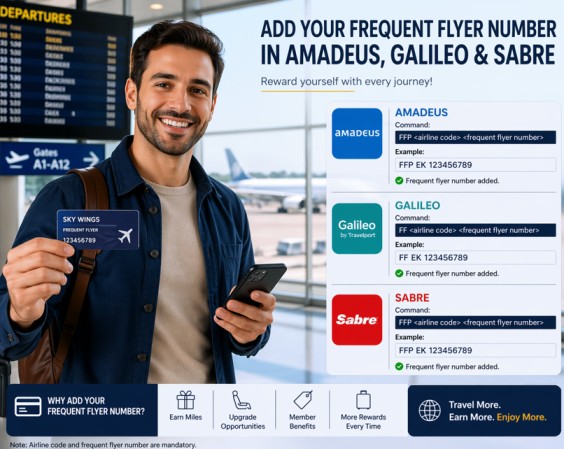
Here’s how you actually do it in Sabre, Galileo, and Amadeus – without the headache.
Sabre – Short and direct
Sabre is simple. You just tell the system: here’s the airline, here’s the number, and here’s which passenger it belongs to.
Same airline (passenger flies BA, miles go to BA)
FFBA1234567-1.1
That means:
FF= frequent flyerBA= British Airways1234567= their card number1.1= passenger 1, segment 1
Different airline (passenger flies BA, but wants miles on AA)
FFAA1234567/BA-2.1
This says: put the miles on their American Airlines account, even though they’re flying British Airways.
Very useful for alliance partners.
Galileo – Starts with M.P
Galileo uses M.P (Modify Passenger). Think of it as “let me change something for this passenger.”
Same airline
M.P1/LH123456789
M.P1= modify passenger 1LH= Lufthansa123456789= their frequent flyer number
Different airline
M.P2/AF123456789/DL
- Passenger 2
- Air France card number
123456789 - But they’re flying Delta (
DL)
So Delta will send the miles to their Air France account.
Amadeus – A few ways to do it
Amadeus gives you options. Here’s what you’ll actually use.
Quick add during PNR creation
FFAAF-01234509876
This adds an Air France frequent flyer number directly. Amadeus checks the airline’s own database automatically.
Add it to a specific passenger
FFNAF-01234509876/P1
The N means “name” – so you’re attaching the number to passenger 1.
Share the number with partner airlines (very important)
Sometimes a passenger has a KLM card, but they’re flying on Etihad and Qatar Airways.
FFNKL-123456789,EY,QR
This tells Amadeus: take this KLM number, and send it to Etihad and Qatar too. No need to type it three times.
Check if two airlines work together
Not all airlines share miles. Before you promise anything, check:
VFFDBA
This shows you which airlines have an agreement with British Airways (BA).
The SSR method (works with almost every airline)
If the FF command doesn’t work, use this old but reliable method:
SR FQTV BA-FF22115
This is a “special service request” – it’s slower but safer.
How to add Passport Data in Amadeus Galileo Sabre
What Causes ADM in Airlines? Full Guide for Travel Agencies
How to add contact details in Amadeus, Galileo, Sabre
LinkedIN



