How to Change a Passenger Name in a PNR: Sabre, Galileo & Amadeus
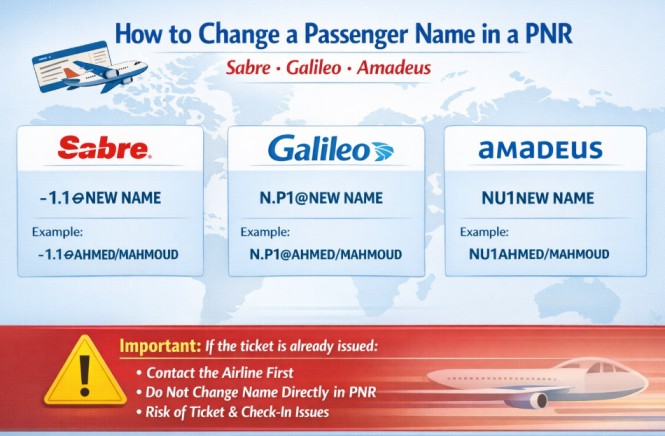
At times a travel agent may need to correct a passenger name inside a PNR (Passenger Name Record). Each GDS system uses a different command to update the name field.
Below are the common commands used in Sabre, Galileo, and Amadeus — with the exact syntax you need in daily work.
Sabre
To modify a passenger name in Sabre, use the following command:
This updates the name element for passenger 1.1 in the PNR. The 1.1 refers to the name field number — the first 1 is the name item number, and the second 1 is the passenger number within that item.
- Before the first End Transaction: You can change surname and given name freely. You can also delete a name field item and enter the correct one.
- After the first End Transaction: You must call all airlines in the itinerary to obtain authorization. Once approved, insert the authorization in the
5H-field. - For surname changes after end transact: You should make the request to Sabre Helpdesk by email.
5H- Field Format for Authorized Name Changes
Galileo
In Galileo, the command format for editing a passenger name is:
This changes the name for Passenger 1 in the booking. The P1 refers to Passenger 1. You can also change other name fields using N.P2@, N.P3@, and so on.
- Before end transact: Name items can be amended any number of times.
- After end transact: Name changes must be verified with the airline first.
- To delete a name field:
N.P1@(leave the new name blank). - To add a name remark:
N.P1@*P-C11.
Other Useful Name Commands
| Command | Purpose |
|---|---|
| N.P1@ | Delete name field for Passenger 1 |
| N.P1@*P-C11 | Add or change name remark |
| *N | Display all names in the PNR |
Amadeus
In Amadeus, you can modify the passenger name using:
This updates the name for Passenger 1 in the reservation. The NU entry (Name Update) changes the passenger name while retaining all associated elements — segments, contact details, SSR, and ticketing information stay intact.
- Before ticketing: Name changes are allowed as per airline policy.
- Surname changes: Use the format
NU1/1FRANCIS/DELMRwhere1/1indicates name element 1, passenger 1. - After ticketing: You must contact the airline before making any change. Unauthorized changes may cause ADMs.
Alternative Amadeus Format for Precise Control
Important Notice
Most airlines require agents to contact the airline first or follow a specific name correction policy before making any change. Editing the name after ticketing without approval can cause:
- Ticket problems at check-in
- Boarding denial if the name does not match the passport
- Penalties — for example, Cathay Pacific charges USD 60 per passenger for unauthorized name changes
- Automatic cancellation of the entire itinerary without advance notification
- Agency Debit Memos (ADMs) for non-compliance
Always confirm the airline’s rules before modifying a passenger name.
What Most Airlines Allow (Name Correction vs Name Change)
| Action | Allowed? | Notes |
|---|---|---|
| Fix a typing mistake | Usually yes | Often free within a specific window (e.g., 24 hours after booking) |
| Add or delete a middle name | Usually yes | Same person only — documentation may be required |
| Swap surname and first name | Usually yes | Same person only |
| Correct a title (Mr/Mrs/Ms) | Usually yes | Same person only |
| Update name to match passport | Usually yes | Documentation required |
| Transfer ticket to a different person | Strictly prohibited | Most airlines do not permit this under any circumstances |
Quick Reference Table
Bookmark this table for quick access during your daily work.
| GDS | Command | Example | Notes |
|---|---|---|---|
| Sabre | -1.1¤NEW NAME | -1.1¤AHMED/MAHMOUD | Before first End Transaction; after that, requires airline authorization |
| Sabre (authorized) | 5H-CHNT … | 5H-CHNT Correct name AUTH BY SINxx | Insert authorization in 5H- field |
| Galileo | N.P1@NEW NAME | N.P1@AHMED/MAHMOUD | Before end transact; after that, verify with airline |
| Galileo (delete) | N.P1@ | — | Delete name field for Passenger 1 |
| Amadeus | NU1NEW NAME | NU1AHMED/MAHMOUD | Retains all associated elements |
| Amadeus (precise) | NU2/1LAST/FIRST MR | NU2/1FRANCIS/DELMR | Name element 2, passenger 1, with title |
Frequently Asked Questions
What is the command to change a passenger name in Sabre?
-1.1¤NEW NAME to update a passenger name. The 1.1 refers to the name element number. For example: -1.1¤AHMED/MAHMOUD. Before the first End Transaction, surname and given name changes are allowed. After the PNR is ended, you must obtain airline authorization and insert a 5H- remark before making any name change.What is the command to change a passenger name in Galileo?
N.P1@NEW NAME. The P1 refers to Passenger 1. For example: N.P1@AHMED/MAHMOUD. Before end transact, name items can be amended any number of times. After end transact, name changes must be verified with the airline first.What is the command to change a passenger name in Amadeus?
NU1NEW NAME to update the name for Passenger 1. For example: NU1AHMED/MAHMOUD. The NU entry retains all associated elements in the PNR. For more precise control, the format NU2/1last name/first name can be used.Can I change a passenger name after the ticket is issued?
What is the difference between a name correction and a name change?
What happens if I change a name without airline authorization?
How do I change a surname in Sabre after the PNR is ended?
5H-CHNT Correct name AUTH BY SINxx Name of airline staff). For surname changes specifically, you should make the request to Sabre Helpdesk by email.📚 Related Guides
Practise Name Change Commands in a Safe Simulator
Create a free GDS HUB account and practise name change commands in Sabre, Galileo and Amadeus — no live data, no risk.
Start Practising Free →


