Infant with a Seat (INS) in GDS: Galileo, Sabre & Amadeus Booking Guide
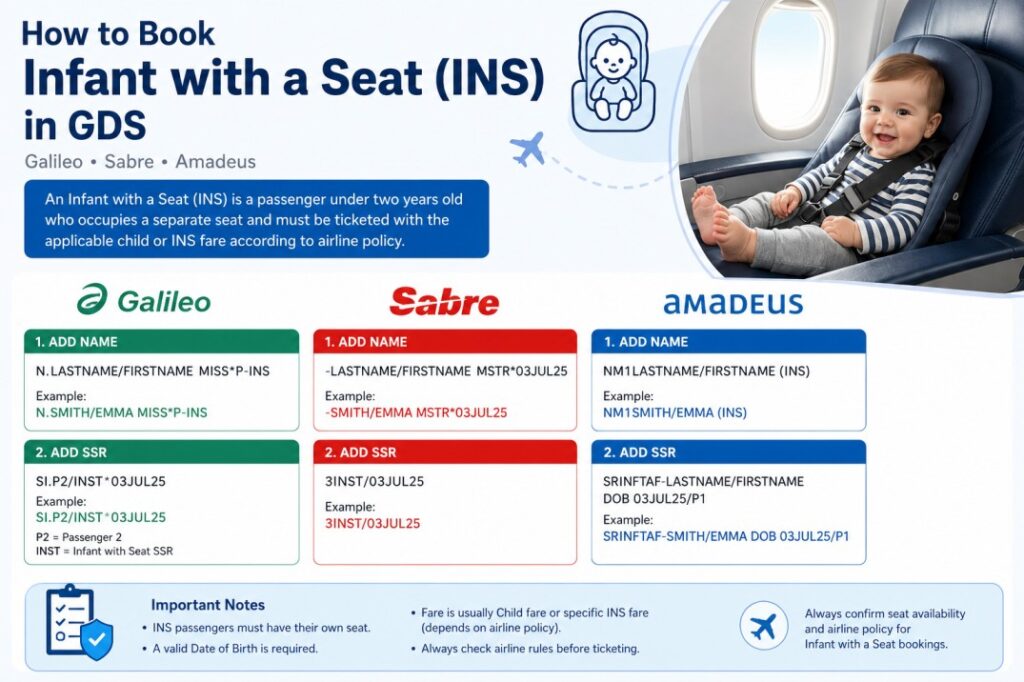
When creating airline reservations, one of the most misunderstood passenger types is the Infant with a Seat (INS). Many beginners know how to book a regular infant (INF), but they become confused when the airline requires the infant to occupy a separate seat. Fortunately, all major Global Distribution Systems (GDS) support this type of booking with specific entries.
In this guide, you’ll learn exactly what an INS is, how it differs from a standard INF, when airlines require it, and the exact booking entries for Galileo, Sabre and Amadeus — plus fare rules, seat assignment policies, ticketing considerations, and the common mistakes to avoid.
What Is an Infant with a Seat (INS)?
An Infant with a Seat (INS) is a passenger under two years old who occupies an individual seat during the flight.
Unlike a standard infant (INF), who travels on the accompanying adult’s lap, an INS passenger must have:
- A separate seat — assigned and paid for
- An individual passenger name in the PNR
- A child or INS fare — depending on airline policy
- A valid ticket issued for the infant
Many airlines also require an approved child restraint system (CRS) or infant car seat for safety, especially during takeoff, landing and turbulence.
Difference Between INF and INS
The distinction between the two passenger types affects pricing, seat assignment and the booking entries you use in the GDS.
| Feature | Infant (INF) | Infant with Seat (INS) |
|---|---|---|
| Travel position | On adult’s lap | In a separate seat |
| Fare type | Usually infant fare only | Usually child fare or INS fare |
| Seat assignment | No individual seat | Separate assigned seat |
| Linked to adult | Linked to one adult | Still linked to accompanying adult |
| Boarding seat | No seat assignment | Receives a seat assignment |
| Safety equipment | Not required | Approved CRS often required |
When Is an INS Required?
An airline may require an Infant with Seat booking when:
- Parents want the baby to travel in an approved child seat (CRS)
- The infant has grown large enough that the parents prefer purchasing an additional seat
- Airline policy requires a seat for safety equipment
- Long-haul flights where additional comfort is preferred for both parent and infant
Although the passenger is still under two years old, the reservation is treated differently from a lap infant. In most GDS systems, the INS entry triggers a different SSR and requires a valid date of birth.
Age Requirement
Generally:
- INF: Under 2 years old without a seat
- INS: Under 2 years old with a purchased seat
Galileo Booking
In Galileo, the INS passenger is entered as a separate passenger type.
Add the Passenger Name
This creates the passenger as an Infant with Seat.
Add the INS SSR
Sabre Booking
Sabre uses a different syntax but follows the same concept.
Add the Passenger
The date of birth identifies the passenger as an infant requiring a seat.
Add the SSR
Amadeus Booking
In Amadeus, the passenger is entered using the INS passenger type.
Add the Passenger
Add the SSR
This associates the INS passenger information with the accompanying adult.
Why Is the Date of Birth Required?
The Date of Birth allows the airline to:
- Confirm passenger eligibility
- Apply the correct fare
- Validate age restrictions
- Determine applicable taxes
- Ensure compliance with airline safety regulations
Seat Assignment for INS
Because an INS passenger occupies a separate seat, airlines generally allow seat assignment during or after booking. However, many carriers have restrictions regarding where infants may sit. For example:
- Exit rows are not permitted for infants in any configuration
- Bulkhead seating may have airline-specific rules (often preferred for bassinet positions on long-haul)
- Some airlines require approved child restraint devices to be used in the assigned seat
Always follow the operating carrier’s seating policy before confirming seat selection with the passenger.
Ticketing Considerations
Before issuing the ticket, always verify the following:
- Confirm the passenger type is correctly set to INS
- Verify the Date of Birth is accurate
- Ensure the INS SSR has been accepted by the airline
- Price the itinerary after completing all passenger information
- Check whether the airline uses a child fare or a dedicated INS fare
- Confirm baggage allowance — it may differ from standard child tickets
Common Mistakes
Many beginners accidentally:
- Book the passenger as a normal child instead of INS
- Forget to add the INS SSR
- Enter an incorrect Date of Birth
- Price the booking before adding the SSR
- Assume every airline uses the same fare rules
Best Practices
For every Infant with a Seat booking, follow these steps:
- Add the passenger using the correct INS format
- Enter the Date of Birth exactly as shown in the passport
- Add the required INS SSR to the PNR
- Price the reservation after completing all passenger information
- Review airline-specific INS policies before ticket issuance
- Confirm seat availability for both the adult and the infant
Summary
An Infant with a Seat (INS) is an infant under two years old who travels in their own seat instead of sitting on an accompanying adult’s lap. Although the passenger is still considered an infant, the reservation process differs from a standard INF booking.
Most airlines require a separate passenger record, an INS SSR, and either a child fare or a dedicated INS fare. By understanding the correct entries in Galileo, Sabre and Amadeus, travel agents can create accurate reservations, avoid ticketing issues, and ensure a smooth travel experience for families.
Whether you’re preparing for a GDS certification or working as a travel consultant, mastering INS bookings is an essential skill that will help you handle family reservations with confidence.
Frequently Asked Questions
What is an Infant with a Seat (INS) in GDS?
What is the difference between INF and INS?
How do I book an Infant with a Seat in Galileo?
How do I book an Infant with a Seat in Sabre?
How do I book an Infant with a Seat in Amadeus?
Why is the date of birth required for an INS booking?
When does an airline require an Infant with a Seat booking?
Practise INS Bookings in a Real GDS Simulator
Create a free GDS HUB account and practise Infant with Seat bookings, SSR entries, and fare pricing in Amadeus, Sabre and Galileo — no live data, no risk.
Start Practising Free →


