Adding a frequent flyer number should take seconds. In practice, it is one of the easiest ways to lose a passenger’s miles: the card belongs to one airline, the flight is operated by another, and each GDS expects the entry in a different order. Sabre uses FF, Galileo uses M.P, and Amadeus uses FFN — plus a manual SR FQTV fallback when the automated entry is rejected.
Here are the exact formats for all three systems, including partner-airline sharing, verification, and the mistakes that cause missing miles.
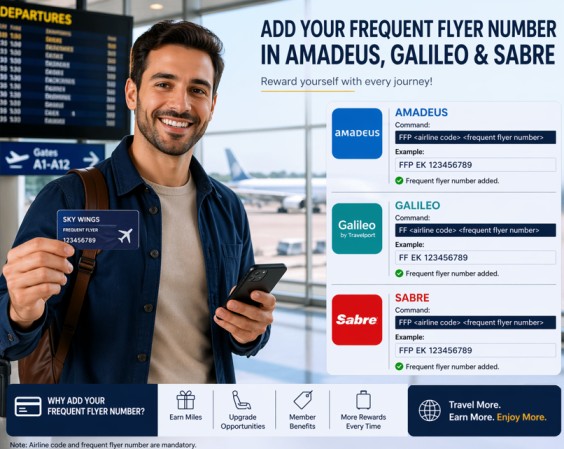
| GDS | Same airline | Partner airline | Check agreements |
|---|---|---|---|
| Sabre | FFBA1234567-1.1 | FFAA1234567/BA-2.1 | Airline program rules |
| Galileo | M.P1/LH123456789 | M.P2/AF123456789/DL | M*BA |
| Amadeus | FFNAF-01234509876/P1 | FFNKL-123456789,EY,QR | VFFD BA |
In this guide
Before you type: program airline vs operating airline
The first airline code in the entry is the loyalty program. The second code — when the format includes one — is the airline operating the flight. Getting these two backwards is the most common reason a number is accepted but miles never post.
A passenger flying British Airways but collecting miles with American Airlines has two airlines in the booking: BA is operating, AA is the program. The entry must start with AA and point to BA, not the other way around.
Two more checks before you type anything:
- The name must match. Airlines reject frequent flyer data when the card name does not match the passenger name in the PNR. If the name is wrong, fix the PNR first — see the Amadeus PNR name change guide.
- Add the number before ticketing. After the ticket is issued, changes may require airline approval or a reissue.
Sabre
Sabre: the FF entry
Sabre uses FF (Frequent Flyer). The entry is short, but the passenger and segment numbers at the end are easy to mix up.
Same airline
FFBA1234567-1.1FFFrequent flyer entryBABritish Airways — the loyalty program1234567The passenger’s card number-1.1Name field 1 (passenger 1), segment 1
For passenger 2 on the same segment, use -2.1. For passenger 1 on segment 2, use -1.2. The first number is the passenger, the second is the segment.
Different airline
FFAA1234567/BA-2.1AAAmerican Airlines — the loyalty program1234567The AAdvantage number/BAThe airline operating the flight-2.1Passenger 2, segment 1
Read it as: credit the American Airlines account for the British Airways flight. This is the format to use for alliance partners and codeshares.
After entering the number, end the transaction and check that the FQTV element appears in the PNR. If the number is wrong, delete the FQTV line and re-enter it — do not add a second number on top of the first. More Sabre entries are covered in the Sabre commands guide.
Galileo
Galileo: the M.P entry
Galileo stores loyalty data in the mileage membership field, and the entry starts with M.P — Modify Passenger. Think of it as: “change something for this passenger.”
Same airline
M.P1/LH123456789M.PModify Passenger1Passenger 1LHLufthansa — the loyalty program123456789The Miles & More number
Different airline
M.P2/AF123456789/DLM.P2Modify passenger 2AFAir France — the loyalty program123456789The Flying Blue number/DLDelta — the airline operating the flight
This is called cross-accrual: the passenger flies Delta, but the miles go to their Air France account. The card airline comes first; the operating airline comes after the slash.
Changing or deleting a number
The mileage field is passenger-related and cannot be edited in place. Delete the old entry first:
M.P1@Then enter the new number. To check which airlines have a mileage agreement with a carrier, use:
M*BASome airlines — including KL, AF, and LH — use interactive frequent flyer control, so Galileo may validate the number against the airline in real time. For the wider command set, see the Galileo commands guide.
Amadeus
Amadeus: FFN, FFA and the SSR fallback
Amadeus gives you several entries, and the right one depends on whether you are creating the PNR or updating an existing one.
Quick add during PNR creation
FFAAF-01234509876FFA pulls the passenger name and frequent flyer data from the airline’s database. It works when the airline uses the Amadeus frequent flyer database. The FFA command guide covers the full syntax.
Add a number to an existing PNR
FFNAF-01234509876/P1FFN adds the number and creates the FQTV SSR. /P1 attaches it to passenger 1. If the PNR has several passengers, always include the passenger association — otherwise the number may land on the wrong person. Full details are in the FFN command guide.
Verify the name registered to the number
FFDAF-01234509876Use FFD before adding the number if you are unsure whether the card belongs to the passenger. It displays the name from the airline’s database, which helps you catch mismatches before the airline rejects the FQTV. The FFDAF guide explains the display.
Share the number with partner airlines
FFNKL-123456789,EY,QRThis tells Amadeus: take the KLM number and send it to Etihad and Qatar as well. Add /P1 if the PNR has multiple passengers. This is useful when the passenger holds one alliance card but the itinerary includes several partner carriers.
Check whether two airlines work together
VFFD BAVFFD BA shows the airlines that have a frequent flyer agreement with British Airways. Enter VFFD alone to list all carriers. Check this before you promise a passenger that their miles will post — not every airline shares miles. The VFFD command guide has more examples.
The SSR fallback
SR FQTV BA-123456789/P1When FFN is rejected, or the airline does not use the Amadeus database, use the manual SSR. It is slower because the airline must accept the special service request, but it works across more carriers. Some airlines require their own program prefix in the number — use the format shown in the airline’s documentation. The Amadeus SR guide covers SSR syntax.
Do not use both methods for the same number. Adding FFN and then SR FQTV creates duplicate FQTV elements. Pick one method, verify it in the PNR, and only switch if the first one was rejected.
Which Amadeus entry should you use?
| Situation | Entry | Why |
|---|---|---|
| Creating a PNR, airline uses the Amadeus database | FFA[airline]-[number] | Adds the name and number together |
| Updating an existing PNR | FFN[airline]-[number]/P1 | Creates the FQTV for a specific passenger |
| Verifying the cardholder’s name | FFD[airline]-[number] | Displays the name from the airline database |
| Sharing with partner airlines | FFN[airline]-[number],XX,YY | Adds partner carriers in one entry |
| Checking airline agreements | VFFD BA | Shows which airlines accept each other’s numbers |
| Airline rejects the automated entry | SR FQTV BA-[number]/P1 | Manual SSR accepted by the airline |
Step-by-step: add a frequent flyer number without errors
- Ask for the card and confirm the program. Do not assume the airline on the ticket is the airline on the card. Ask: “Which program should the miles go to?”
- Check the name. The name on the card must match the PNR. If it does not, fix the passenger name before adding the number.
- Choose the entry for your GDS. Sabre
FF, GalileoM.P, or AmadeusFFN. - Attach it to the correct passenger. Sabre uses the name field number, Galileo uses
P1, and Amadeus uses/P1. - Check partner eligibility. Use
M*BAin Galileo orVFFD BAin Amadeus when the program and the operating airline are different. - Verify the FQTV in the PNR. Do not assume the entry worked because the screen moved on. Display the PNR and look for the FQTV element.
- End the transaction. In Amadeus, use
ETorER; an unsaved PNR loses the number. See the ET command guide. - Tell the passenger what to expect. Miles usually post after the flight is flown, not at booking. Keep the boarding pass and allow several weeks before chasing missing miles.
Common mistakes and how to fix them
The number is accepted but the miles never post
The most likely cause is a mismatch between the program airline and the operating airline. A number stored against the wrong carrier can sit in the PNR without ever reaching the loyalty account. Delete the FQTV element and re-enter it with the program airline first.
The airline rejects the number
Check the number itself, the airline code, and the name. In Amadeus, run FFD to display the registered name. If the automated entry still fails, switch to the manual SR FQTV method. The FQTV error guide walks through the rejection cases.
The number went to the wrong passenger
Passenger association is the second most common error. In Sabre, check the -2.1 part; in Galileo, check M.P2; in Amadeus, check /P2. Delete the element and re-enter it against the right passenger.
There are duplicate FQTV elements
This usually happens when an agent tries FFN, sees no immediate confirmation, and then adds SR FQTV as well. Remove the duplicate before ticketing — see the XE cancel elements guide.
The fare does not earn miles
Not every ticket earns miles. Deep-discount economy, some consolidator fares, charter flights, and certain award tickets may earn zero. Check the fare rules and the airline’s program terms before promising miles.
The name on the card is different
Airlines match the frequent flyer name to the PNR name. A missing middle name, a maiden name, or a reversed first and last name can cause a rejection. Correct the PNR name first, then re-enter the number.
Frequent flyer checklist for agents
- Program and number confirmed with the passenger.
- Cardholder name matches the PNR.
- Number attached to the correct passenger.
- Partner agreement checked when the operating airline differs.
- Number added before ticketing.
- FQTV visible in the PNR.
- Transaction ended and PNR re-displayed.
- Passenger told when and how the miles should appear.
Pro tip: Save the passenger’s program and number in their profile or CRM record. The next booking becomes a copy-paste instead of a transcription exercise — and transcription is where most wrong numbers come from.
Summary
Every GDS stores loyalty data differently, but the logic is the same: program airline first, operating airline second, correct passenger always. Sabre uses FF, Galileo uses M.P, and Amadeus uses FFN with FFA for new PNRs and SR FQTV as the manual fallback. Verify the FQTV before ticketing, end the transaction, and tell the passenger what to expect. That five-minute habit prevents most missing-mile complaints.
Frequently asked questions
What is the fastest way to add a frequent flyer number in Amadeus?
For an existing PNR, use FFN[airline]-[number]/P1. During PNR creation, FFA[airline]-[number] can add the name and number from the airline database in one entry.
What does FFN mean in Amadeus?
FFN is the frequent flyer number entry. It adds the loyalty number to the PNR and creates the FQTV special service request for the associated passenger.
How do I add a partner airline number in Sabre?
Use FF[program airline][number]/[operating airline]-[passenger].[segment]. For example, FFAA1234567/BA-2.1 credits an American Airlines number for a British Airways flight to passenger 2 on segment 1.
What does M.P mean in Galileo?
M.P stands for Modify Passenger. The entry M.P1/LH123456789 adds a Lufthansa mileage number to passenger 1. For cross-accrual, add the operating airline after a slash: M.P2/AF123456789/DL.
Why was my frequent flyer number rejected?
The usual reasons are a name mismatch, the wrong airline code, an invalid number, or a program that does not have an agreement with the operating carrier. Verify the number, check the name, and use the manual SR FQTV entry if the automated method fails.
Do frequent flyer numbers guarantee miles?
No. The number must be valid, the fare must be eligible, the airline must have a partner agreement, and the passenger must actually fly. Some fares earn zero miles, and some partners earn at reduced rates.
Can I add the number after the ticket is issued?
Sometimes, but it is safer to add it before ticketing. After issuance, the airline may need to update the FQTV record, and some carriers will not accept changes without a reissue or a direct request.



