Blog
-
Sabre Queue : A Quick Guide for Managing PNRs
If you work with Sabre GDS you have probably seen queue numbers showing up over the place. These queues are not random lists they are actually very important tools that help travel agents manage bookings in a efficient way without missing any important updates. What are Sabre queues? Sabre queues are lists of Passenger…
-
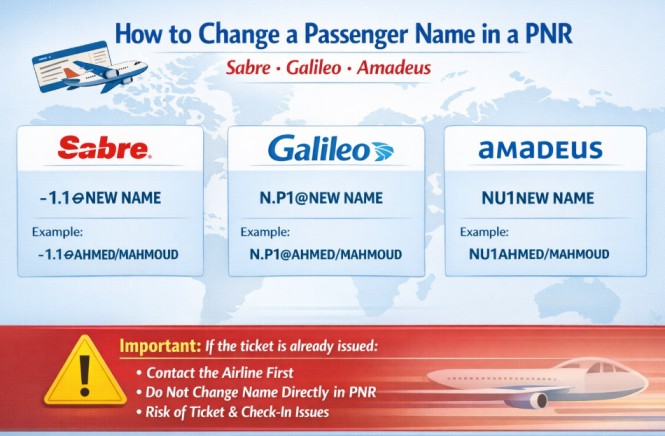
How to Change a Passenger Name in a PNR
Sometimes a travel agent may need to correct a passenger name inside a PNR (Passenger Name Record). Each GDS system uses a different command to update the name field. Below are the common commands used in Sabre, Galileo, and Amadeus. Sabre To modify a passenger name in Sabre, use the following command: Example: This…
-
The Ultimate Sabre Commands Guide
Command / Entry Explanation / Description SIGN IN / OUT / AREA SI*1234 Sign into all areas *S* Display all working areas S/* Redisplay sign in message SO* Sign out from all areas ¤B Change to area B SABRE AVAILABILITY 130JUNBAHPAR Sabre availability 130JUNBAHPAR‡GF With specific airline 130JUNBAHPAR2P With departure time 130JUNBAHNYC1APAR Via connecting…
-
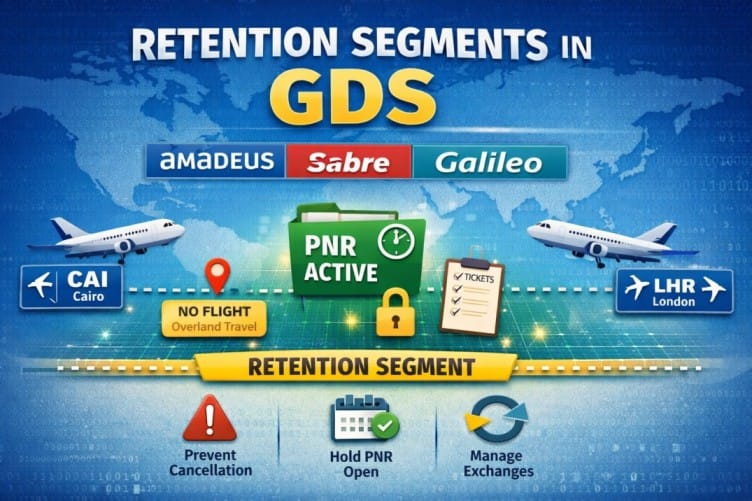
Retention Segments: How to Keep Your PNR Active
If you work with global distribution systems (GDS) like Amadeus, Sabre, or Travelport Galileo, understanding Retention Segments is essential. They allow travel agents to keep PNRs active without adding new flight segments, which is critical for managing bookings, exchanges, and reporting. What Is a Retention Segment? A Retention Segment is a non-air segment added…
-

How to Use ARNK in Amadeus, Sabre & Galileo
If you work with Global Distribution Systems (GDS) like Amadeus, Sabre, or Travelport Galileo, you have likely seen ARNK inside a PNR. This guide explains clearly what ARNK means, why it is important, and how to add it in different GDS systems. What Does ARNK Mean? ARNK stands for Arrival Unknown. It is a…
-
How to Void Tickets in Sabre & Galileo
When working in global distribution systems (GDS) like Sabre and Travelport Galileo, the Void function allows travel agents to cancel a ticket on the same day of issuance before the reporting period closes. In other words, it helps agents correct mistakes quickly without going through the full refund process. For example, Void is commonly…
-
How to Create a Group PNR in (Amadeus, Galileo & Sabre)
Group bookings are different from individual reservations.When handling large passenger numbers (20–100+), even small mistakes can cause major operational issues. This guide explains how to create a Group PNR in the three main GDS systems:Amadeus, Travelport Galileo, and Sabre GDS. Amadeus Group PNR Commands Step Command Description Create Group NG80 GROUPNAME Define group PNR…
-
How to Create a PNR in Sabre
booking process. The following example demonstrates how to create a complete booking for a trip from Cairo (CAI) to Sharjah (SHJ) on EgyptAir. Step 1: Search for Flight Availability This entry displays flight availability from Cairo to Sharjah on 24 September, with EgyptAir as the preferred airline. Step 2: Sell Seats This command sells…