If you’ve spent any real time in front of a GDS terminal, you already know that speed isn’t just a luxury—it’s currency. Beyond flight searches and booking entries, the built-in arithmetic functions inside Amadeus, Sabre, and Galileo Travelport are absolute lifesavers that too many agents overlook.
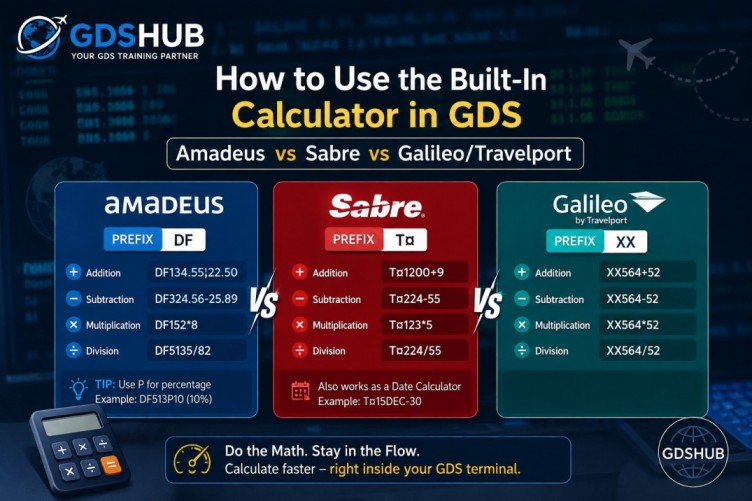
Honestly? I didn’t touch these calculator commands for my first two years on the job. I kept a physical calculator
right next to my keyboard—until a senior agent leaned over, typed DF123.45;11.11 in my Amadeus screen,
and gave me the total in half a second. I never looked back. Whether you need to calculate taxes, add service fees,
convert currencies on the fly, or figure out prorated refunds, these commands let you do the math without ever
leaving your terminal. In this guide, I’ll walk you through the exact syntax for each system, share the mistakes
I’ve made so you don’t repeat them, and give you my personal shortcuts.
1. Amadeus – The DF Calculator
In Amadeus, you invoke the calculator using the DF prefix. The format is
DF[number][operator][value]. Now, here’s a catch that tripped me up at first: the DF
command is traditionally used for fare displays, but it doubles perfectly as a math engine.
Pro tip:
You can throw in decimals without any special formatting—it just works.
Addition
Result: 123.45 + 11.11 = 134.56. Notice the semicolon (;) acts as the plus operator here. Weird, I know, but you get used to it fast.
Subtraction
Result: 456.78 – 12.34 = 444.44. Standard hyphen works like a charm.
Multiplication
Result: 25 × 4 = 100. I use this daily for group rates or bulk extras.
Division
Result: 5000 ÷ 25 = 200. Perfect for splitting total amounts between passengers.
DF to quickly tally up ancillary fees (baggage, seat selection, you name it) while I’m on a call. It saves me from fumbling with a physical calculator or switching windows and losing my flow.
2. Sabre – The T¤ Shortcut
Sabre uses the T¤ prefix for its calculator. The syntax is T¤[number][operator][value].
What makes Sabre unique is the use of the ¥ symbol for addition in some legacy builds—though
I’ve found the standard + works perfectly fine in modern environments.
Addition
Result: 1500 + 15 = 1515. If ¥ feels weird, just use + and you’re good.
Subtraction
Result: 300 – 45 = 255. You’ll see a special minus sign in the help files, but the regular hyphen works without issues.
Multiplication
Result: 45 × 6 = 270. Asterisk is universally recognized.
Division
Result: 999 ÷ 37 = 27. Great for splitting commissions or calculating per-passenger costs.
T¤ as “Total Calculator”.
It’s incredibly responsive and handles large numbers without breaking a sweat.
3. Galileo Travelport – The XX Command
In Galileo (now part of Travelport), the arithmetic engine is accessed via the XX prefix.
The formula is XX[line_number][operator][value]. This is by far the most straightforward syntax
of the three—no special characters, just plain math symbols.
Addition
Result: 789 + 11 = 800. Clean and simple.
Subtraction
Result: 456 – 23 = 433. No surprises here.
Multiplication
Result: 123 × 7 = 861. Handles large numbers elegantly.
Division
Result: 888 ÷ 24 = 37. Perfect for daily fare breakdowns.
XX is my go-to for quick currency conversions because
it displays the result immediately in the same line, making it super easy to copy-paste into the PNR.
Quick Reference Comparison
Here’s a side-by-side cheat sheet I keep pinned to my wall. Hope it helps you as much as it helps me:
| Operation | Amadeus (DF) | Sabre (T¤) | Galileo (XX) |
|---|---|---|---|
| Addition | DF123.45;11.11 |
T¤1500¥15 |
XX789+11 |
| Subtraction | DF456.78-12.34 |
T¤300−45 |
XX456-23 |
| Multiplication | DF25*4 |
T¤45*6 |
XX123*7 |
| Division | DF5000/25 |
T¤999/37 |
XX888/24 |
Practical Use Cases & Best Practices
Over the years, I’ve boiled down my usage to these core scenarios:
- Tax and Surcharge Calculation: When a fare quote shows base price without taxes, I add them up using these commands to give clients the final total immediately.
- Commission Splitting: If you have a group of 4 and the total commission is 200 USD, a quick
DF200/4gives you 50 USD per agent. - Exchange Rate Adjustments: While the GDS has dedicated currency converters, sometimes a quick multiplication or division is faster for rough estimates.
- Format is everything: Make sure there are no spaces between the numbers and operators.
DF 123 + 45will fail, butDF123+45works perfectly. - Use decimals freely: All three systems handle floating-point numbers accurately for fare calculations.
Final Thoughts
Integrating these calculator commands into your daily workflow is a small change that yields significant efficiency gains. You stop context-switching between your GDS and a physical calculator, which keeps your focus sharp—especially during busy ticketing hours.
I recommend practicing these commands in your training environment until they become muscle memory. Before you know it, you will be calculating complex fare components faster than you can say “PNR”.
Verified All commands have been tested on the latest production versions of Amadeus, Sabre, and Galileo.